Get certified for free when you join Fabric Data Days 2026 and dive into Fabric, Power BI, SQL, AI, and other essential data skills.
Join nowData Days is here! Join us now for 60+ days of learning, challenges, and connection. Learn more
Hi,
I want to use Role based security to group test results dynamically.
I want my users (teachers) to be able to compare their students against the rest as a benchmark. Teachers should be able to see all test scores, but only put names to their own students. Is this possible??
@MaxW wrote:
Hi,
I want to use Role based security to group test results dynamically.
I want my users (teachers) to be able to compare their students against the rest as a benchmark. Teachers should be able to see all test scores, but only put names to their own students. Is this possible??
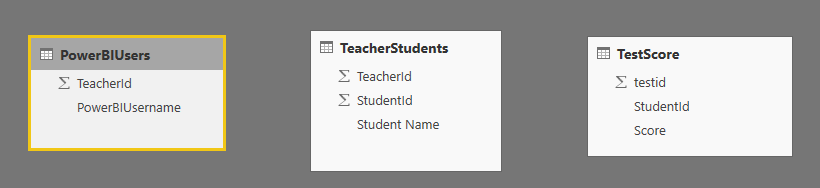
With those 3 tables, I don't think the logged teacher can see the "REST".
In my opnion, to compare current logged teacher's students against the rest, you'll have to duplicate the PowerBIUsers table and aggregate data in QueryEditor, then you'll get total 4 tables, your 3 and the aggregated 1(which doesn't connect to any table of the 3). Then you apply RLS on the PowerBIUsers table so that the logged teacher can see their own students detailed score and also see the aggregated 4th table.
Hi Eric,
Thanks for taking the time to reply, I'm a bit confused by the detail though. Can you clarify what model structure you're suggesting?
Don't miss out on Data Days, June 15 through August 7. Learn Fabric, Power BI, SQL, AI and more.
Check out the May 2026 Power BI update to learn about new features.
| User | Count |
|---|---|
| 23 | |
| 23 | |
| 21 | |
| 17 | |
| 13 |
| User | Count |
|---|---|
| 58 | |
| 51 | |
| 40 | |
| 30 | |
| 24 |