Get certified for free when you join Fabric Data Days 2026 and dive into Fabric, Power BI, SQL, AI, and other essential data skills.
Join nowData Days is here! Join us now for 60+ days of learning, challenges, and connection. Learn more
Hi,
I'd like to know if there is a way to dynamically set a folder path if I have to update all the Excel files in the folders every week?
IE:
On my desktop, I have a folder named: KPI.
KPI has 5 sub-folders:
1. Time
2. Work
3. Employee
4. Sales
5. Status
All 5 of them have Excel files.
The problem I'm having is if I move the KPI folder from the desktop, I'll have a problem with the queries.
Is there a solution to this?
Solved! Go to Solution.
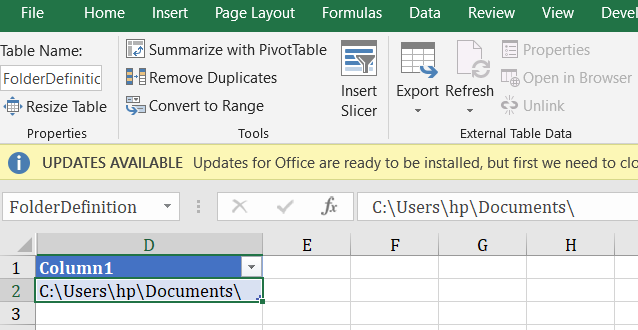
I think this there is another way to make folder dynamic
This is via an Excel Table or Named Range
Now in your query you can define the folderpath which is linked to a Cell in ExcelTable
let
FolderPath= Excel.CurrentWorkbook(){[Name="FolderDefinition"]}[Content]{0}[Column1],
Source = Excel.Workbook(File.Contents(FolderPath & "FileName.xlsx"), null, true),
MyTable = Source{[Item="Table1",Kind="Table"]}[Data]
in
MyTable
Hi @misen13
Here is the document for your reference.
https://biinsight.com/power-bi-desktop-query-parameters-part-1/
Regards,
Cherie
I think this there is another way to make folder dynamic
This is via an Excel Table or Named Range
Now in your query you can define the folderpath which is linked to a Cell in ExcelTable
let
FolderPath= Excel.CurrentWorkbook(){[Name="FolderDefinition"]}[Content]{0}[Column1],
Source = Excel.Workbook(File.Contents(FolderPath & "FileName.xlsx"), null, true),
MyTable = Source{[Item="Table1",Kind="Table"]}[Data]
in
MyTable
Hi @misen13
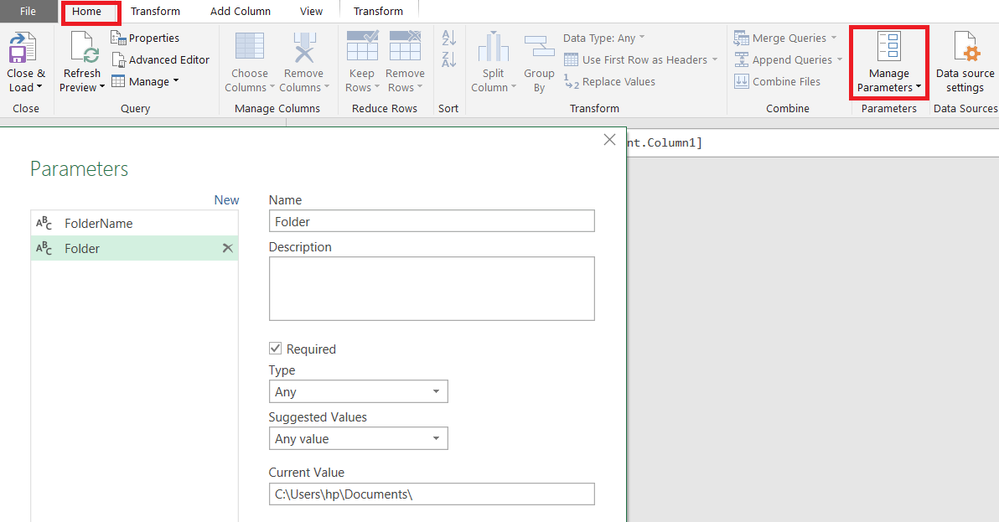
You can use Parameters
Define your folder address in a parameter and use it as a reference in your Queries.
So when you change the folder.. you just have to change address once in the Parameter
Don't miss out on Data Days, June 15 through August 7. Learn Fabric, Power BI, SQL, AI and more.
Check out the May 2026 Power BI update to learn about new features.
| User | Count |
|---|---|
| 23 | |
| 23 | |
| 21 | |
| 20 | |
| 15 |
| User | Count |
|---|---|
| 58 | |
| 54 | |
| 42 | |
| 30 | |
| 24 |