cancel
Showing results for 
Search instead for 
Did you mean: 

The Power BI Data Visualization World Championships is back! Get ahead of the game and start preparing now! Learn more

Reply
misen13
Frequent Visitor

Dynamic folder location

Hi,


I'd like to know if there is a way to dynamically set a folder path if I have to update all the Excel files in the folders every week?

IE:

On my desktop, I have a folder named: KPI.

KPI has 5 sub-folders:

1. Time

2. Work

3. Employee

4. Sales

5. Status

All 5 of them have Excel files.

The problem I'm having is if I move the KPI folder from the desktop, I'll have a problem with the queries.

Is there a solution to this?


1 ACCEPTED SOLUTION

@misen13 @v-cherch-msft


I think this there is another way to make folder dynamic


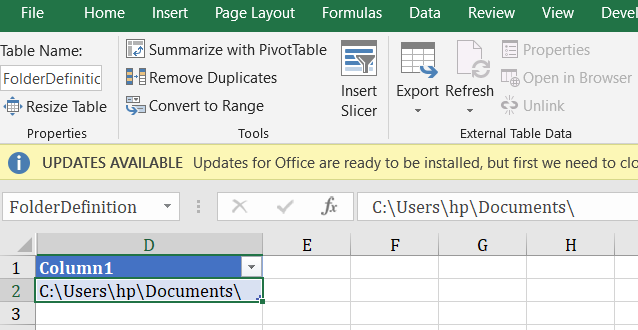
This is via an Excel Table or Named Range


dynamicfolder.png


Now in your query you can define the folderpath which is linked to a Cell in ExcelTable

let

FolderPath= Excel.CurrentWorkbook(){[Name="FolderDefinition"]}[Content]{0}[Column1],
Source = Excel.Workbook(File.Contents(FolderPath & "FileName.xlsx"), null, true),
MyTable = Source{[Item="Table1",Kind="Table"]}[Data]
in
    MyTable


View solution in original post

3 REPLIES 3
v-cherch-msft
Microsoft Employee
Microsoft Employee

Hi @misen13


Here is the document for your reference.

https://biinsight.com/power-bi-desktop-query-parameters-part-1/


Regards,

Cherie

Community Support Team _ Cherie Chen
If this post helps, then please consider Accept it as the solution to help the other members find it more quickly.

@misen13 @v-cherch-msft


I think this there is another way to make folder dynamic


This is via an Excel Table or Named Range


dynamicfolder.png


Now in your query you can define the folderpath which is linked to a Cell in ExcelTable

let

FolderPath= Excel.CurrentWorkbook(){[Name="FolderDefinition"]}[Content]{0}[Column1],
Source = Excel.Workbook(File.Contents(FolderPath & "FileName.xlsx"), null, true),
MyTable = Source{[Item="Table1",Kind="Table"]}[Data]
in
    MyTable


Zubair_Muhammad
Community Champion
Community Champion

Hi @misen13


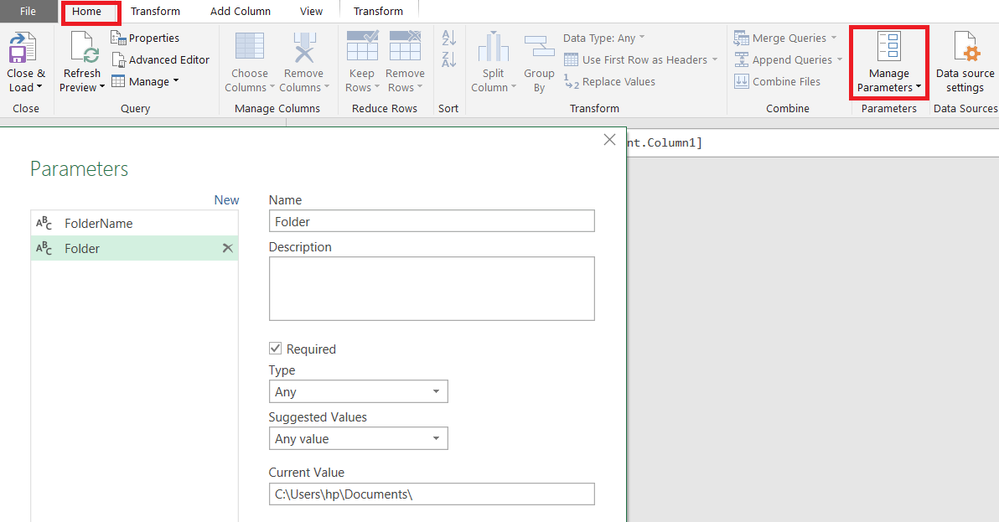
You can use Parameters


Define your folder address in a parameter and use it as a reference in your Queries.

So when you change the folder.. you just have to change address once in the Parameter


param.png

Helpful resources

Announcements
Power BI DataViz World Championships

Power BI Dataviz World Championships

The Power BI Data Visualization World Championships is back! Get ahead of the game and start preparing now!

December 2025 Power BI Update Carousel

Power BI Monthly Update - December 2025

Check out the December 2025 Power BI Holiday Recap!

FabCon Atlanta 2026 carousel

FabCon Atlanta 2026

Join us at FabCon Atlanta, March 16-20, for the ultimate Fabric, Power BI, AI and SQL community-led event. Save $200 with code FABCOMM.

Top Solution Authors