cancel
Showing results for 
Search instead for 
Did you mean: 

Level up your Power BI skills this month - build one visual each week and tell better stories with data! Get started

Reply
Anonymous
Not applicable

Dynamic column header in Table or Matrix

Hello Experts,


I need my table or matrix column to show month and year names according to the slicer value choose. Can anyone help me with this,


I am attaching my model and my Requirements:

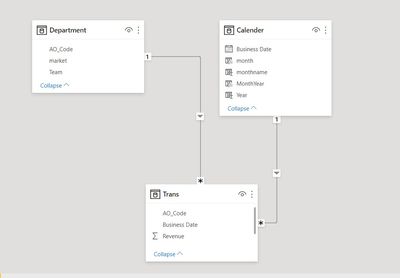
My data Model:

rajaguru85_0-1630218906596.jpeg

My Requirement : 

rajaguru85_1-1630218932386.png


Many Thanks :


1 ACCEPTED SOLUTION
Sergione
Regular Visitor

Hi @Anonymous, I faced similar problem some time ago. Unfortunately until now I'm convinced that there is no way to achieve the desired result. Let me explan why and the workaround you can use:

  • You can't change column or measure name dynamically. In data model wheteher it's a column or a mesure it has a static name you gave it when created, so in your case "Selected Month Revenue Amount" and "Previous Month Revenue Amount". You can change a display name when using measures on your viasulas, but again, it's not dynamic (e.g. instead of "Selected Month Revenue Amount" you might rename it to "CY Rev Amt" or something similar).
  • To get a dynamic output, you need another measure that will calculate it for you. So this two new tehcnical measures would provide strings "Mar-20" and "Feb-20" that will change dynamically based on filter selection. Then you need to deside how to integrate it in the report.
    • You might have dynamic info text as a separate visual, telling your user what period is selected now (text higlighted in yellow are the measures):

Sergione_2-1630233105616.png


    • Or you can add a pop-up explanation using visual header tooltip:
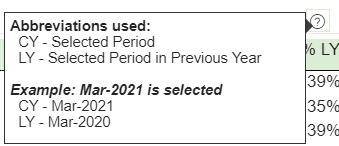
Sergione_1-1630232961912.png


I hope it will help you!

Feel free to approach me if you like these ideas but need more details on how to implement them.

View solution in original post

2 REPLIES 2
Anonymous
Not applicable

@Sergione 

Thank you for your deatiled explanation. Much appreciated. 

Sergione
Regular Visitor

Hi @Anonymous, I faced similar problem some time ago. Unfortunately until now I'm convinced that there is no way to achieve the desired result. Let me explan why and the workaround you can use:

  • You can't change column or measure name dynamically. In data model wheteher it's a column or a mesure it has a static name you gave it when created, so in your case "Selected Month Revenue Amount" and "Previous Month Revenue Amount". You can change a display name when using measures on your viasulas, but again, it's not dynamic (e.g. instead of "Selected Month Revenue Amount" you might rename it to "CY Rev Amt" or something similar).
  • To get a dynamic output, you need another measure that will calculate it for you. So this two new tehcnical measures would provide strings "Mar-20" and "Feb-20" that will change dynamically based on filter selection. Then you need to deside how to integrate it in the report.
    • You might have dynamic info text as a separate visual, telling your user what period is selected now (text higlighted in yellow are the measures):

Sergione_2-1630233105616.png


    • Or you can add a pop-up explanation using visual header tooltip:

Sergione_1-1630232961912.png


I hope it will help you!

Feel free to approach me if you like these ideas but need more details on how to implement them.
Helpful resources

Announcements
April Power BI Update Carousel

Power BI Monthly Update - April 2026

Check out the April 2026 Power BI update to learn about new features.

Fabric SQL PBI Data Days

Data Days 2026 coming soon!

Sign up to receive a private message when registration opens and key events begin.

New to Fabric survey Carousel

New to Fabric Survey

If you have recently started exploring Fabric, we'd love to hear how it's going. Your feedback can help with product improvements.

Power BI DataViz World Championships carousel

Power BI DataViz World Championships - June 2026

A new Power BI DataViz World Championship is coming this June! Don't miss out on submitting your entry.