Share feedback directly with Fabric product managers, participate in targeted research studies and influence the Fabric roadmap.
Sign up nowGet Fabric certified for FREE! Don't miss your chance! Learn more
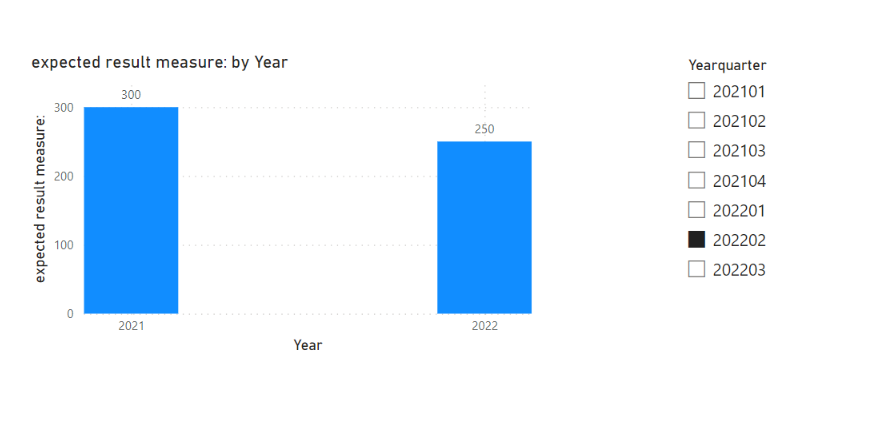
I have data in below format , user wants single select slicer on Yearquarter , when he select 202202 , we have to show him two bars one for year 2021 and one for year 2022 . 2021 bar should show 202101,202102 value and 2022 bar should show 2022101 , 202202 value as a sum
2021-300
2022-150
when user selects 202203 it should show all three quarters of 2022 and first three quarters of 2021.
| Yearquarter | Year | Quarter | Sales |
| 202101 | 2021 | 01 | 100 |
| 202102 | 2021 | 02 | 200 |
| 202103 | 2021 | 03 | 300 |
| 202104 | 2021 | 04 | 400 |
202201 | 2022 | 01 | 120 |
| 202202 | 2022 | 02 | 130 |
| 202203 | 2022 | 03 | 140 |
Solved! Go to Solution.
Hi,
I am not sure if I understood your question correctly, but please check the below picture and the attached pbix file.
expected result measure: =
VAR _sliceryear =
MAX ( 'Calendar'[Year] )
VAR _prevsliceryear = _sliceryear - 1
VAR _slicerquarter =
MAX ( 'Calendar'[Quarter] )
RETURN
SUMX (
FILTER (
Data,
Data[Year]
IN { _sliceryear, _prevsliceryear }
&& Data[Quarter] <= _slicerquarter
),
Data[Sales]
)
Hi,
I am not sure if I understood your question correctly, but please check the below picture and the attached pbix file.
expected result measure: =
VAR _sliceryear =
MAX ( 'Calendar'[Year] )
VAR _prevsliceryear = _sliceryear - 1
VAR _slicerquarter =
MAX ( 'Calendar'[Quarter] )
RETURN
SUMX (
FILTER (
Data,
Data[Year]
IN { _sliceryear, _prevsliceryear }
&& Data[Quarter] <= _slicerquarter
),
Data[Sales]
)
Share feedback directly with Fabric product managers, participate in targeted research studies and influence the Fabric roadmap.
| User | Count |
|---|---|
| 59 | |
| 51 | |
| 42 | |
| 18 | |
| 14 |
| User | Count |
|---|---|
| 108 | |
| 104 | |
| 35 | |
| 26 | |
| 26 |