Get certified for free when you join Fabric Data Days 2026 and dive into Fabric, Power BI, SQL, AI, and other essential data skills.
Join nowTry your skills in the Power BI Dataviz World Championship! Round one ends June 26. Join now
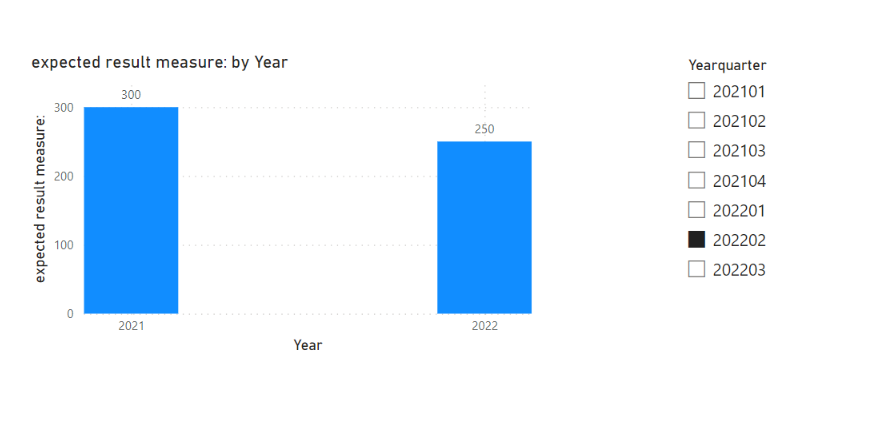
I have data in below format , user wants single select slicer on Yearquarter , when he select 202202 , we have to show him two bars one for year 2021 and one for year 2022 . 2021 bar should show 202101,202102 value and 2022 bar should show 2022101 , 202202 value as a sum
2021-300
2022-150
when user selects 202203 it should show all three quarters of 2022 and first three quarters of 2021.
| Yearquarter | Year | Quarter | Sales |
| 202101 | 2021 | 01 | 100 |
| 202102 | 2021 | 02 | 200 |
| 202103 | 2021 | 03 | 300 |
| 202104 | 2021 | 04 | 400 |
202201 | 2022 | 01 | 120 |
| 202202 | 2022 | 02 | 130 |
| 202203 | 2022 | 03 | 140 |
Solved! Go to Solution.
Hi,
I am not sure if I understood your question correctly, but please check the below picture and the attached pbix file.
expected result measure: =
VAR _sliceryear =
MAX ( 'Calendar'[Year] )
VAR _prevsliceryear = _sliceryear - 1
VAR _slicerquarter =
MAX ( 'Calendar'[Quarter] )
RETURN
SUMX (
FILTER (
Data,
Data[Year]
IN { _sliceryear, _prevsliceryear }
&& Data[Quarter] <= _slicerquarter
),
Data[Sales]
)
Hi,
I am not sure if I understood your question correctly, but please check the below picture and the attached pbix file.
expected result measure: =
VAR _sliceryear =
MAX ( 'Calendar'[Year] )
VAR _prevsliceryear = _sliceryear - 1
VAR _slicerquarter =
MAX ( 'Calendar'[Quarter] )
RETURN
SUMX (
FILTER (
Data,
Data[Year]
IN { _sliceryear, _prevsliceryear }
&& Data[Quarter] <= _slicerquarter
),
Data[Sales]
)
| User | Count |
|---|---|
| 23 | |
| 20 | |
| 19 | |
| 19 | |
| 10 |
| User | Count |
|---|---|
| 53 | |
| 52 | |
| 41 | |
| 37 | |
| 32 |