cancel
Showing results for 
Search instead for 
Did you mean: 

Try your skills in the Power BI Dataviz World Championship! Round one ends June 26. Join now

Reply
vnwakoh
New Member

Dynamic/Variable Column Header Names Changing with Slicer

Hello folks,


So I have this query that gives me income per month, as well as columns to show what the last 2 months' income have been. You can see an excerpt of the data below;

PeriodActual Income2 Months AgoA month AgoA Month Ago Name2 Months Ago Name
Jan                      2,000                     1,500                   1,600DecNov
Feb                      2,100                     1,600                   2,000JanDec
Mar                      1,700                     2,000                   2,100FebJan


How can I use the names of the "Ago Months" as column Headers for "2 Months Ago" and "A Month Ago", assuming I decide to use period as a slicer.


I would really appreciate responses.


Many thanks.

1 ACCEPTED SOLUTION
v-qiuyu-msft
Community Support
Community Support

Hi @vnwakoh,


We are not able to change column headers based on selected slicer visual. To work around the issue, we can optimize data below in Query Editor: 


1. Select [A Month Ago Name] and [2 Months Ago Name] columns then click Unpivot Columns.

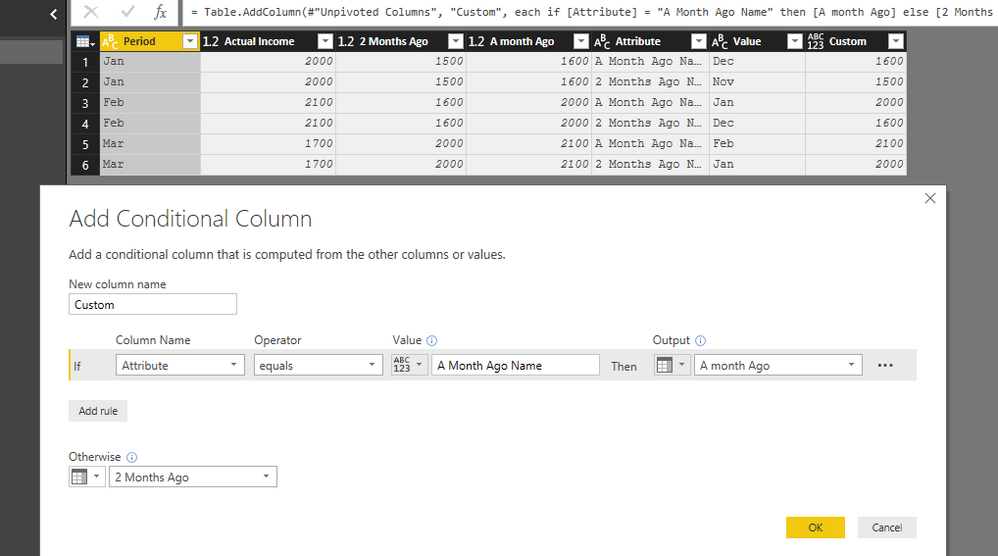
2. Add a conditional column: 

e2.PNG


Apply changes and back to report, create a matrix visual: 

e3.PNG


Best Regards,
Qiuyun Yu 

Community Support Team _ Qiuyun Yu
If this post helps, then please consider Accept it as the solution to help the other members find it more quickly.

View solution in original post

4 REPLIES 4
Samanalytiks
New Member

Hello  v-qiuyu-msft


People are not in a habit to think win-win situation. A few turns back with the accepted solution. Rests are just to have fun with the resources available.

v-qiuyu-msft
Community Support
Community Support

Hi @vnwakoh,


We are not able to change column headers based on selected slicer visual. To work around the issue, we can optimize data below in Query Editor: 


1. Select [A Month Ago Name] and [2 Months Ago Name] columns then click Unpivot Columns.

2. Add a conditional column: 

e2.PNG


Apply changes and back to report, create a matrix visual: 

e3.PNG


Best Regards,
Qiuyun Yu 

Community Support Team _ Qiuyun Yu
If this post helps, then please consider Accept it as the solution to help the other members find it more quickly.

Thanks @v-qiuyu-msft


Let me quickly try this out.

Hi @vnwakoh,


Have you tried the workaround in your scenario? Is it working for you? 


Best Regards,
Qiuyun Yu 

Community Support Team _ Qiuyun Yu
If this post helps, then please consider Accept it as the solution to help the other members find it more quickly.

Helpful resources

Announcements
Fabric Data Days is here Carousel

Fabric Data Days 2026

Don't miss out on Data Days, June 15 through August 7. Learn Fabric, Power BI, SQL, AI and more.

Power BI DataViz World Championships carousel

Power BI DataViz World Championships - June 2026

A new Power BI DataViz World Championship is coming this June! Don't miss out on submitting your entry.