Learn from the best! Meet the four finalists headed to the FINALS of the Power BI Dataviz World Championships! Register now
Hello folks,
So I have this query that gives me income per month, as well as columns to show what the last 2 months' income have been. You can see an excerpt of the data below;
| Period | Actual Income | 2 Months Ago | A month Ago | A Month Ago Name | 2 Months Ago Name |
| Jan | 2,000 | 1,500 | 1,600 | Dec | Nov |
| Feb | 2,100 | 1,600 | 2,000 | Jan | Dec |
| Mar | 1,700 | 2,000 | 2,100 | Feb | Jan |
How can I use the names of the "Ago Months" as column Headers for "2 Months Ago" and "A Month Ago", assuming I decide to use period as a slicer.
I would really appreciate responses.
Many thanks.
Solved! Go to Solution.
Hi @vnwakoh,
We are not able to change column headers based on selected slicer visual. To work around the issue, we can optimize data below in Query Editor:
1. Select [A Month Ago Name] and [2 Months Ago Name] columns then click Unpivot Columns.
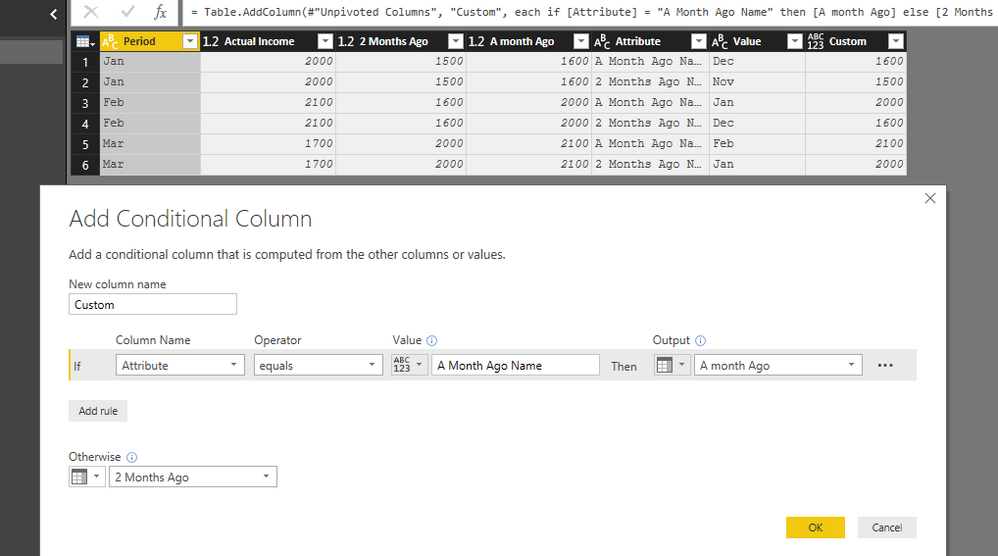
2. Add a conditional column:
Apply changes and back to report, create a matrix visual:
Best Regards,
Qiuyun Yu
Hello v-qiuyu-msft
People are not in a habit to think win-win situation. A few turns back with the accepted solution. Rests are just to have fun with the resources available.
Hi @vnwakoh,
We are not able to change column headers based on selected slicer visual. To work around the issue, we can optimize data below in Query Editor:
1. Select [A Month Ago Name] and [2 Months Ago Name] columns then click Unpivot Columns.
2. Add a conditional column:
Apply changes and back to report, create a matrix visual:
Best Regards,
Qiuyun Yu
Hi @vnwakoh,
Have you tried the workaround in your scenario? Is it working for you?
Best Regards,
Qiuyun Yu
| User | Count |
|---|---|
| 55 | |
| 37 | |
| 26 | |
| 17 | |
| 17 |
| User | Count |
|---|---|
| 69 | |
| 58 | |
| 39 | |
| 21 | |
| 21 |