cancel
Showing results for 
Search instead for 
Did you mean: 

Get Fabric certified for FREE! Don't miss your chance! Learn more

Reply
itsmeanuj
Helper IV
Helper IV

Dynamic Top N

Hi,


I have sales and calls data for each territory and region (See below). I would like to have a table that shows ‘Top 5’ at different levels (Area, Territory, some other in the future, etc). The user wants a slicer/dropdown that allows for changing the metric. For example, if a user selects "Area" in the dropdown then data in the below table should be filtered for those top 5 areas. Similarly for Territory. Please let me know if it makes sense. Thanks, Anuj


AreaTerritoryCallsSales
Area1Territory1131357
Area1Territory2101066
Area1Territory33377
Area1Territory4636331
Area2Territory5414154
Area2Territory6717174
Area2Territory7121268
Area2Territory8151597
Area3Territory9222272
Area3Territory10323237
Area3Territory11808015
Area3Territory12292957
Area4Territory13181885
Area4Territory14181817
Area4Territory15292967
Area4Territory16464647
Area5Territory179929
Area5Territory18656572
Area5Territory19737301
Area5Territory20505073
Area6Territory21515144
Area6Territory22898964
Area6Territory23424231
Area6Territory24101084
1 ACCEPTED SOLUTION

Hi @itsmeanuj 


Kindly check below results:

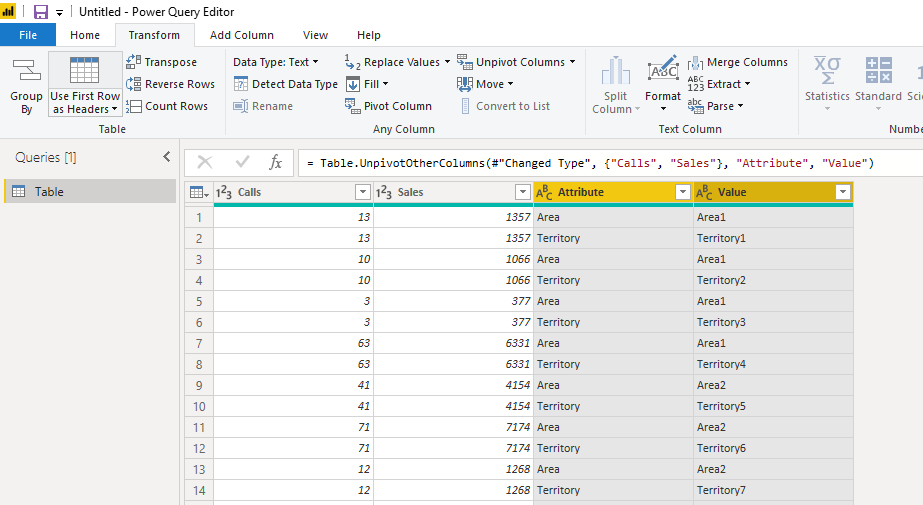
1. You should unpviot the columns firstly:

04.PNG

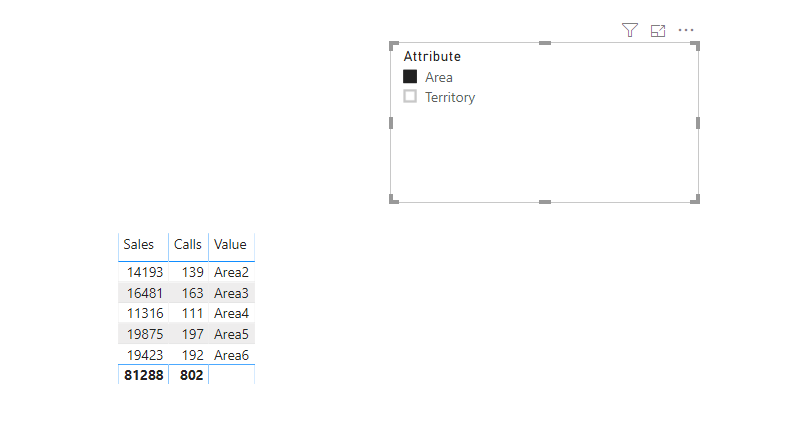
2. Then create the hierarchy by dragging the values to attibute, and generate the visual:

05.PNG06.PNG

Pbix attached.

Community Support Team _ Dina Ye
If this post helps, then please consider Accept it as the solution to help the other members find it more
quickly.

View solution in original post

3 REPLIES 3
amitchandak
Super User
Super User

You have create different rank or Top N measure and then use filter like

https://community.powerbi.com/t5/Desktop/Slicer-MTD-QTD-YTD-to-filter-dates-using-the-slicer/td-p/50...


and use top N to get top measure

https://docs.microsoft.com/en-us/dax/topn-function-dax


Appreciate your Kudos. In case, this is the solution you are looking for, mark it as the Solution.
In case it does not help, please provide additional information and mark me with @

Thanks. My Recent Blogs -Decoding Direct Query - Time Intelligence, Winner Coloring on MAP, HR Analytics, Power BI Working with Non-Standard TimeAnd Comparing Data Across Date Ranges
Proud to be a Datanaut Connect on Linkedin

Share with Power BI Enthusiasts: Full Power BI Video (20 Hours) YouTube
Microsoft Fabric Series 60+ Videos YouTube
Microsoft Fabric Hindi End to End YouTube

@amitchandak - in the link you shared, there is only one column of date where are you calculating and filtering on different time periods. However, in my example, there are 2 different columns and based on the slicer filter it should show the "TOP N". e.g. if a user selects Area in slicer, result would be Top 5 areas on the basis of Sales.


AreaTerritory


AreaSalesCalls
Area519875197
Area619423192
Area316481163
Area214193139
Area411316111

Hi @itsmeanuj 


Kindly check below results:

1. You should unpviot the columns firstly:

04.PNG

2. Then create the hierarchy by dragging the values to attibute, and generate the visual:

05.PNG06.PNG

Pbix attached.

Community Support Team _ Dina Ye
If this post helps, then please consider Accept it as the solution to help the other members find it more
quickly.

Helpful resources

Announcements
Join our Fabric User Panel

Join our Fabric User Panel

Share feedback directly with Fabric product managers, participate in targeted research studies and influence the Fabric roadmap.

FabCon Atlanta 2026 carousel

FabCon Atlanta 2026

Join us at FabCon Atlanta, March 16-20, for the ultimate Fabric, Power BI, AI and SQL community-led event. Save $200 with code FABCOMM.