Join us at FabCon Atlanta from March 16 - 20, 2026, for the ultimate Fabric, Power BI, AI and SQL community-led event. Save $200 with code FABCOMM.
Register now!The Power BI Data Visualization World Championships is back! It's time to submit your entry. Live now!
Good afternoon,
does anyone know a way to put a table at power BI desktop which will be seen only if an specific data was selected? For example, I have, as database a list of failures divided in different systems. I would like to do a kind of report that will show up a table summarizing the failures when I select the system, otherwise, the table must be empty.
Thanks
Solved! Go to Solution.
Hi @maurolpj,
Create a measure for that column you want to apply filters on, rather than directly dragging the column into visual.
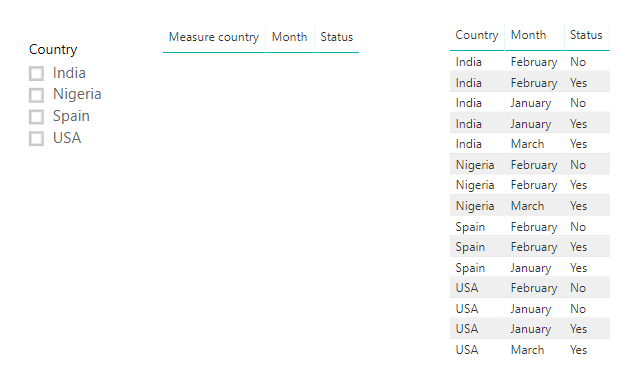
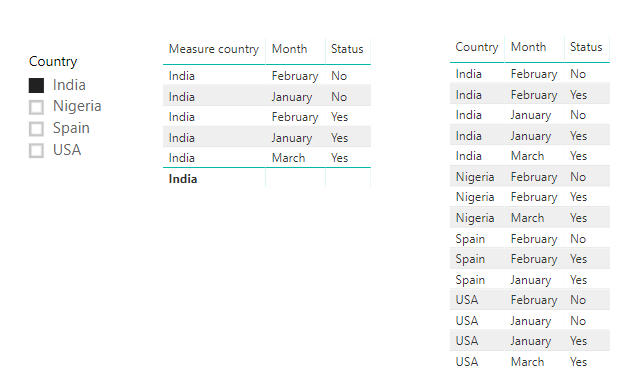
Please check below example.
isselected = CALCULATE(ISFILTERED(table[Country]),ALLSELECTED(table)) Measure country = IF([isselected]=TRUE(),SELECTEDVALUE(table[Country]),BLANK())
Best regards,
Yuliana Gu
Hi @maurolpj,
Create a measure for that column you want to apply filters on, rather than directly dragging the column into visual.
Please check below example.
isselected = CALCULATE(ISFILTERED(table[Country]),ALLSELECTED(table)) Measure country = IF([isselected]=TRUE(),SELECTEDVALUE(table[Country]),BLANK())
Best regards,
Yuliana Gu
Good afternoon, does anyone know a way to put a table at power BI desktop which will be seen only if an specific data was selected? For example, I have, as database a list of failures divided in different systems. I would like to do a kind of report that will show up a table summarizing the failures when I select the system, otherwise, the table must be empty.
Thanks
The Power BI Data Visualization World Championships is back! It's time to submit your entry.
Check out the January 2026 Power BI update to learn about new features.
| User | Count |
|---|---|
| 56 | |
| 41 | |
| 39 | |
| 22 | |
| 21 |
| User | Count |
|---|---|
| 144 | |
| 106 | |
| 63 | |
| 38 | |
| 31 |