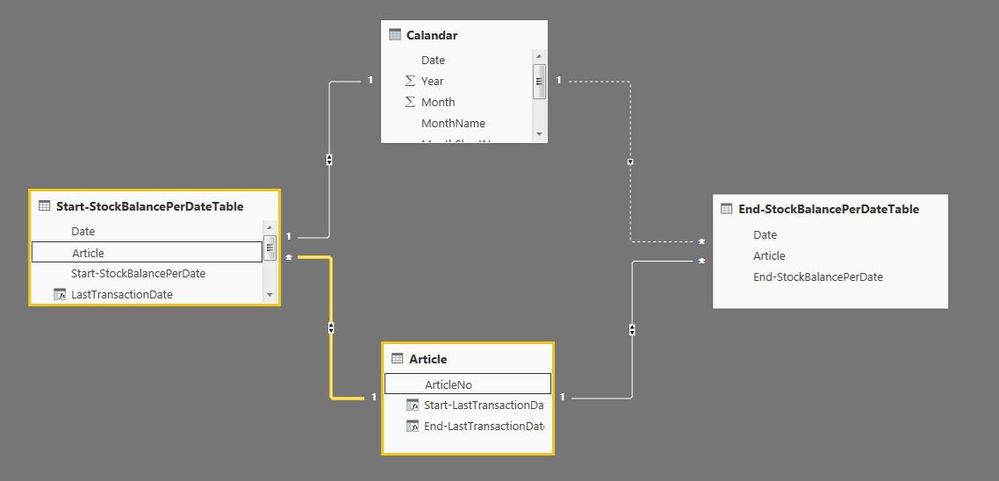
Hi, I'm feeling really close to solve my problem for a dynamic Stock Turnover Report but yet I have some issues where I need your advice first my tables looks like this, Pretty much straight forward. I get the columns in my Article list from, that gives me a start date and an end date for each article.
Start-LastTransactionDate = LASTDATE('Start-StockBalancePerDateTable'[Date])
End-LastTransactionDate = LASTDATE('End-StockBalancePerDateTable'[Date])
But now I want to add two more columns in the Article Table and that is the StockBalancePerDate columns from each Table. (e.g Start-StockBalance for Article A is 29 End-StockBalance for Article A is 35)
I can't get the RELATED function to work, somehow I get a message that the tables don't have any relation, but as you can see in the Relationship-picture there is a relation between the tables.
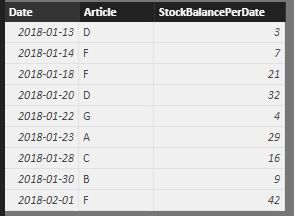 Start-StockBalancePerDateTable'
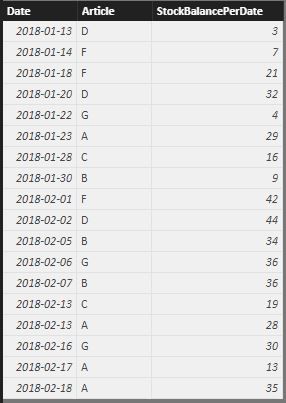 End-StockBalancePerDateTable
 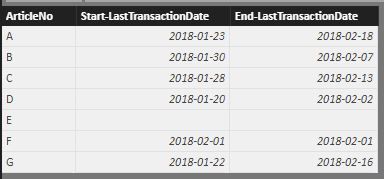 Article
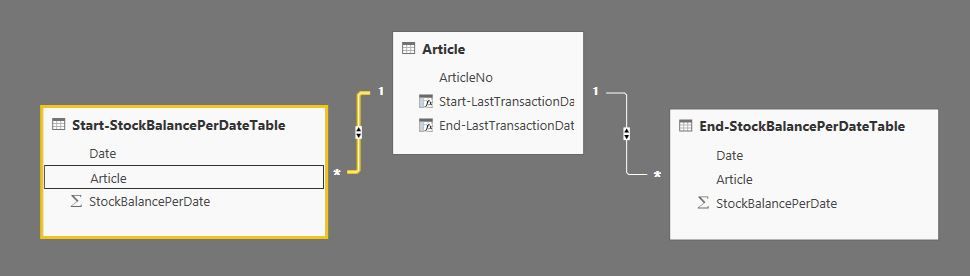 Relationships
Best regards
/Johan