Get certified for free when you join Fabric Data Days 2026 and dive into Fabric, Power BI, SQL, AI, and other essential data skills.
Join nowJuly 7 - July 17 | Round 2 of the Power BI Dataviz World Championships. Don't miss your chance! Learn more
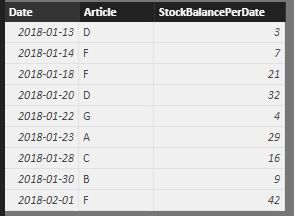
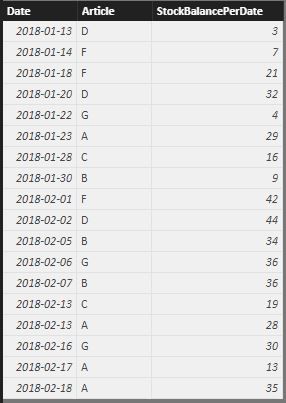
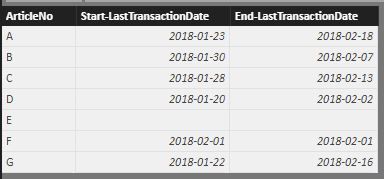
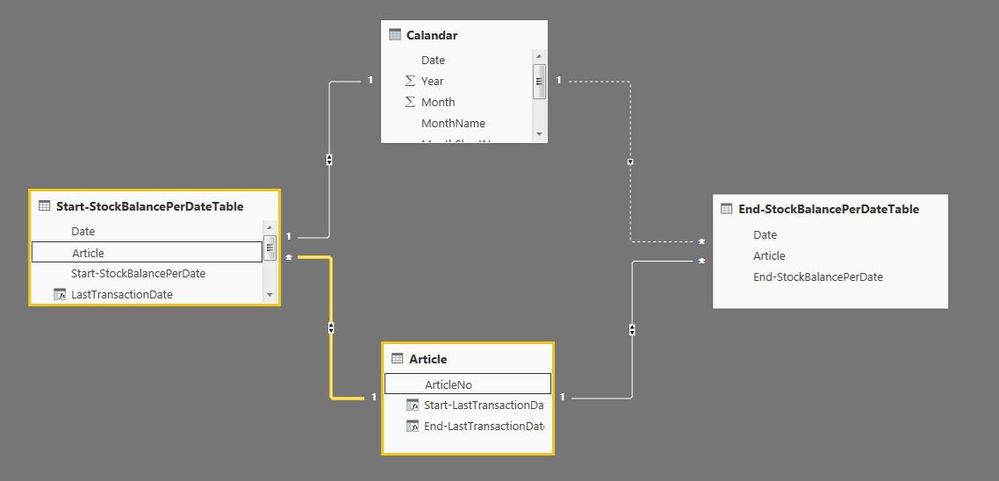
Hi, I'm feeling really close to solve my problem for a dynamic Stock Turnover Report but yet I have some issues where I need your advice first my tables looks like this, Pretty much straight forward. I get the columns in my Article list from, that gives me a start date and an end date for each article.
Start-LastTransactionDate = LASTDATE('Start-StockBalancePerDateTable'[Date])
End-LastTransactionDate = LASTDATE('End-StockBalancePerDateTable'[Date])
But now I want to add two more columns in the Article Table and that is the StockBalancePerDate columns from each Table. (e.g Start-StockBalance for Article A is 29 End-StockBalance for Article A is 35)
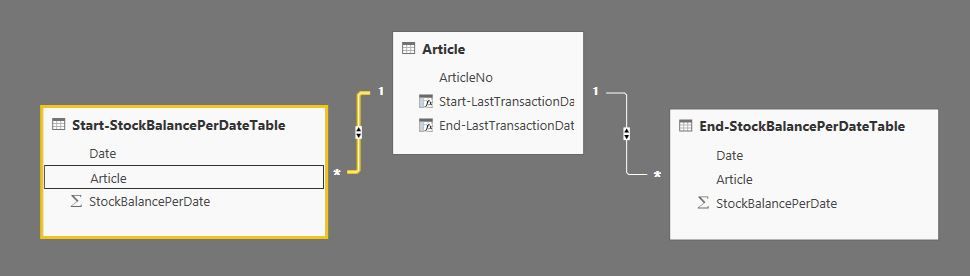
I can't get the RELATED function to work, somehow I get a message that the tables don't have any relation, but as you can see in the Relationship-picture there is a relation between the tables.
Start-StockBalancePerDateTable'
End-StockBalancePerDateTable
Article
Relationships
Best regards
/Johan
Hi @Anonymous
On your last picture it looks strange because It looks like you have clicked on the relation but only the Article filed from Start-Stock is highlighted
The ArticleNo from Article should be highlighted
Can you go on your relation editor and check that the relation is on Article.No on both tables ?
- Quentin
Hi @quentin_vigne I beileve that's just in the picture, heres another one where Article and ArticleNo are highlited, I've also a Calendar table.
Join us in Barcelona for FabCon and SQLCon, the Fabric, Power BI, SQL, and AI community event. Save โฌ200 with code FABCMTY200.
Check out the July 2026 Power BI update to learn about new features.
Join Data Days 2026: 60 days of free live/on-demand sessions, challenges, study groups, and certification opportunities.
| User | Count |
|---|---|
| 31 | |
| 30 | |
| 27 | |
| 24 | |
| 16 |
| User | Count |
|---|---|
| 57 | |
| 36 | |
| 27 | |
| 24 | |
| 20 |