Don't miss your chance to take the Fabric Data Engineer (DP-700) exam on us!
Learn moreNext up in the FabCon + SQLCon recap series: The roadmap for Microsoft SQL and Maximizing Developer experiences in Fabric. All sessions are available on-demand after the live show. Register now
Hi Everyone,
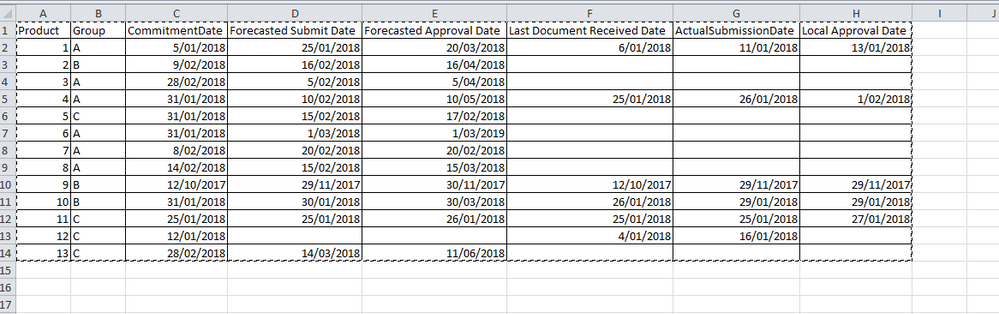
I am a beginner using DAX...I am working on an dataset provided in an excel with the list of products.
Each product has a committed date, Forecast approval date and local approval date.
What is the best visual to track progress for each product using each date field. how to do it using below sample.
Example - Last approval date should be happen before forecasted approval date - how to compare committed, forecasted approval and last approval date?
Also, if the forecasted approval date is today and last approval date is blank - it should be highlighted? how to do this...
Could someone please help me to sort this out - this needs to be a KPI scorecard?
Thanks,
Abi
Solved! Go to Solution.
You may add calculated columns and take advantage of Conditional table formatting in Power BI Desktop.
If you have recently started exploring Fabric, we'd love to hear how it's going. Your feedback can help with product improvements.
A new Power BI DataViz World Championship is coming this June! Don't miss out on submitting your entry.
Share feedback directly with Fabric product managers, participate in targeted research studies and influence the Fabric roadmap.
| User | Count |
|---|---|
| 53 | |
| 45 | |
| 44 | |
| 20 | |
| 19 |
| User | Count |
|---|---|
| 73 | |
| 71 | |
| 34 | |
| 33 | |
| 31 |