Join us at FabCon Atlanta from March 16 - 20, 2026, for the ultimate Fabric, Power BI, AI and SQL community-led event. Save $200 with code FABCOMM.
Register now!Learn from the best! Meet the four finalists headed to the FINALS of the Power BI Dataviz World Championships! Register now
Hi Everyone,
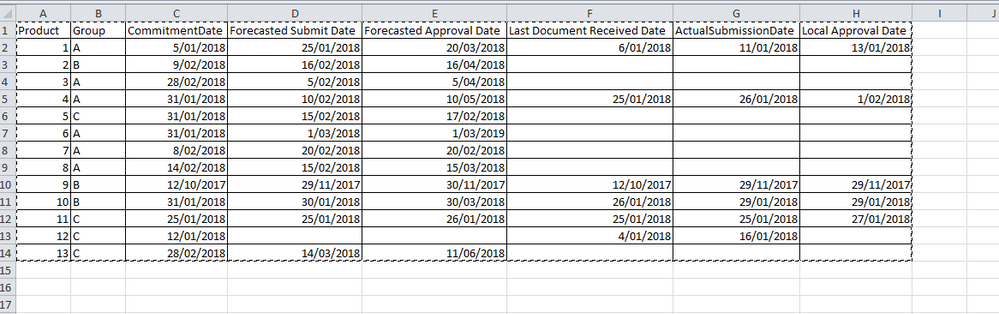
I am a beginner using DAX...I am working on an dataset provided in an excel with the list of products.
Each product has a committed date, Forecast approval date and local approval date.
What is the best visual to track progress for each product using each date field. how to do it using below sample.
Example - Last approval date should be happen before forecasted approval date - how to compare committed, forecasted approval and last approval date?
Also, if the forecasted approval date is today and last approval date is blank - it should be highlighted? how to do this...
Could someone please help me to sort this out - this needs to be a KPI scorecard?
Thanks,
Abi
Solved! Go to Solution.
You may add calculated columns and take advantage of Conditional table formatting in Power BI Desktop.
Share feedback directly with Fabric product managers, participate in targeted research studies and influence the Fabric roadmap.
Check out the February 2026 Power BI update to learn about new features.
| User | Count |
|---|---|
| 53 | |
| 48 | |
| 33 | |
| 16 | |
| 15 |
| User | Count |
|---|---|
| 85 | |
| 70 | |
| 38 | |
| 28 | |
| 25 |