Get certified for free when you join Fabric Data Days 2026 and dive into Fabric, Power BI, SQL, AI, and other essential data skills.
Join nowJuly 7 - July 17 | Round 2 of the Power BI Dataviz World Championships. Don't miss your chance! Learn more
Hi
I am trying to implement dynamic RLS but having trouble and it would be great if I could some help.
I have the below two tables and I have the below formula
[email] = USERPRINCIPALNAME()
It works fine for the first two customerIDs (A and B) but it does not work for Customer IDs C and D.
It would work if I create multiple rows for C and D but that would make the table relationship many to many and produces wrong data.
How could I implement dynamic RLS in this situation ?
| ID | Amount | CustomerID |
| 1 | 100 | A |
| 2 | 200 | A |
| 3 | 300 | B |
| 4 | 400 | B |
| 5 | 500 | B |
| 6 | 600 | C |
| 7 | 700 | C |
| 8 | 800 | D |
| 9 | 900 | D |
| 10 | 1000 | D |
| CustomerID | Customer Name | |
| A | AAA | [email protected] |
| B | BBB | [email protected] |
| C | CCC | [email protected],[email protected] |
| D | DDD | [email protected],[email protected] |
Below table would work but the data would be wrong since it would be many to many relationship.
| CustomerID | Customer Name | |
| A | AAA | [email protected] |
| B | BBB | [email protected] |
| C | CCC | [email protected] |
| C | CCC | [email protected] |
| D | DDD | [email protected] |
| D | DDD | [email protected] |
Solved! Go to Solution.
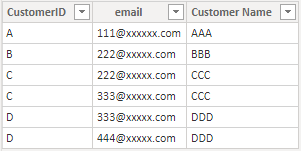
I build two tables like yours to have a test.
Data Table:
User Table (It has been transformed in Power Query editor by Split.):
Build a many to many relationship between CustomerID columns in two tables.
Then Add two Dax expression in Mange roles.
In Data table:
[CustomerID] =
CALCULATE (
MAX(Data[CustomerID]),
FILTER (
User,
User[email] = USERPRINCIPALNAME()
&& User[CustomerID] = Data[CustomerID]
)
)In User table:
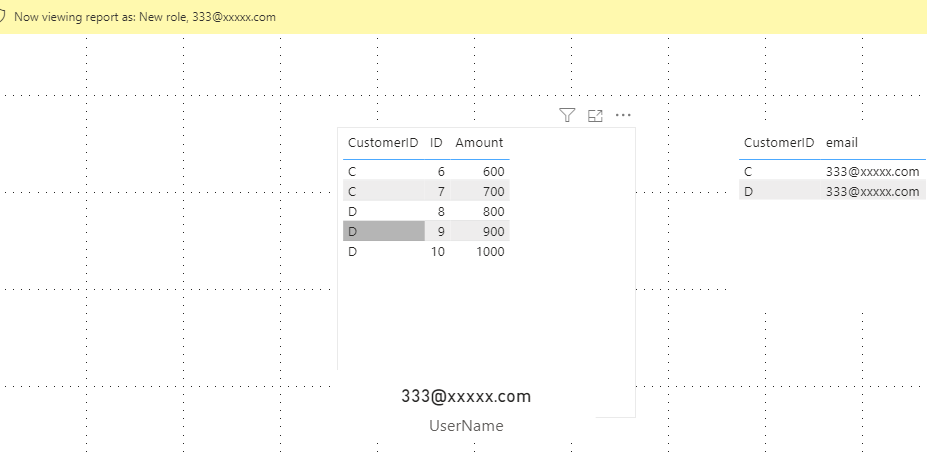
[email] = USERPRINCIPALNAME()Let's use view as to see the result.
You can download the pbix file from this link: Dynamic RLS with multiple USERPRINCIPALNAME()
Best Regards,
Rico Zhou
If this post helps, then please consider Accept it as the solution to help the other members find it more quickly.
I build two tables like yours to have a test.
Data Table:
User Table (It has been transformed in Power Query editor by Split.):
Build a many to many relationship between CustomerID columns in two tables.
Then Add two Dax expression in Mange roles.
In Data table:
[CustomerID] =
CALCULATE (
MAX(Data[CustomerID]),
FILTER (
User,
User[email] = USERPRINCIPALNAME()
&& User[CustomerID] = Data[CustomerID]
)
)In User table:
[email] = USERPRINCIPALNAME()Let's use view as to see the result.
You can download the pbix file from this link: Dynamic RLS with multiple USERPRINCIPALNAME()
Best Regards,
Rico Zhou
If this post helps, then please consider Accept it as the solution to help the other members find it more quickly.
@hideakisuzuki01 , c is having same email ID as B ? Same for D same email ID as C.
Yes, B and C has the same email, because I want both users ([email protected] and [email protected]) to have access to Company B and C`s data.
Does it make sense ?
Join us in Barcelona for FabCon and SQLCon, the Fabric, Power BI, SQL, and AI community event. Save €200 with code FABCMTY200.
If you love stickers, then you will definitely want to check out our community sticker challenge, Barcelona edition!
Check out the July 2026 Power BI update to learn about new features.
| User | Count |
|---|---|
| 30 | |
| 26 | |
| 23 | |
| 23 | |
| 14 |
| User | Count |
|---|---|
| 46 | |
| 33 | |
| 20 | |
| 18 | |
| 16 |