This time we’re going bigger than ever. Fabric, Power BI, SQL, AI and more. We're covering it all. You won't want to miss it.
Learn moreDid you hear? There's a new SQL AI Developer certification (DP-800). Start preparing now and be one of the first to get certified. Register now
Hi
I am trying to implement dynamic RLS but having trouble and it would be great if I could some help.
I have the below two tables and I have the below formula
[email] = USERPRINCIPALNAME()
It works fine for the first two customerIDs (A and B) but it does not work for Customer IDs C and D.
It would work if I create multiple rows for C and D but that would make the table relationship many to many and produces wrong data.
How could I implement dynamic RLS in this situation ?
| ID | Amount | CustomerID |
| 1 | 100 | A |
| 2 | 200 | A |
| 3 | 300 | B |
| 4 | 400 | B |
| 5 | 500 | B |
| 6 | 600 | C |
| 7 | 700 | C |
| 8 | 800 | D |
| 9 | 900 | D |
| 10 | 1000 | D |
| CustomerID | Customer Name | |
| A | AAA | 111@xxxxxx.com |
| B | BBB | 222@xxxxx.com |
| C | CCC | 222@xxxxx.com,333@xxxxx.com |
| D | DDD | 333@xxxxx.com,444@xxxxx.com |
Below table would work but the data would be wrong since it would be many to many relationship.
| CustomerID | Customer Name | |
| A | AAA | 111@xxxxxx.com |
| B | BBB | 222@xxxxx.com |
| C | CCC | 222@xxxxx.com |
| C | CCC | 333@xxxxx.com |
| D | DDD | 333@xxxxx.com |
| D | DDD | 444@xxxxx.com |
Solved! Go to Solution.
I build two tables like yours to have a test.
Data Table:
User Table (It has been transformed in Power Query editor by Split.):
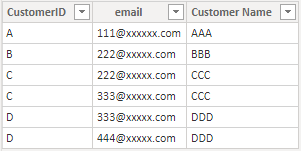
Build a many to many relationship between CustomerID columns in two tables.
Then Add two Dax expression in Mange roles.
In Data table:
[CustomerID] =
CALCULATE (
MAX(Data[CustomerID]),
FILTER (
User,
User[email] = USERPRINCIPALNAME()
&& User[CustomerID] = Data[CustomerID]
)
)In User table:
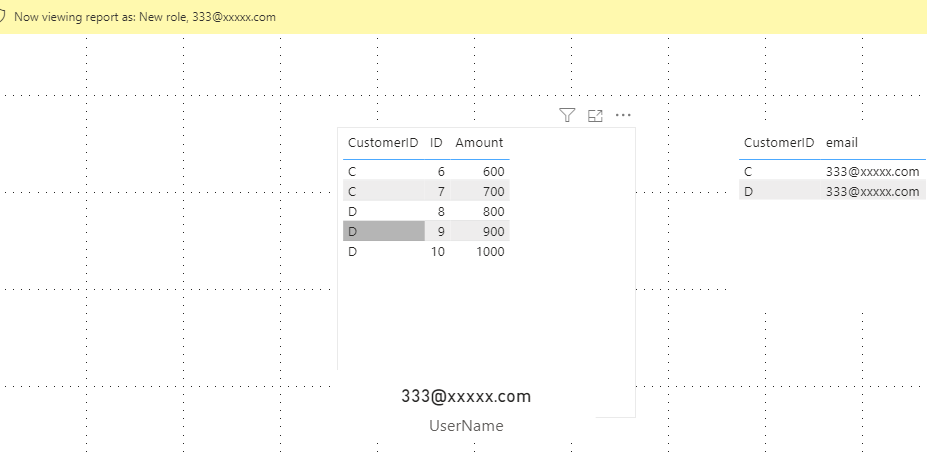
[email] = USERPRINCIPALNAME()Let's use view as to see the result.
You can download the pbix file from this link: Dynamic RLS with multiple USERPRINCIPALNAME()
Best Regards,
Rico Zhou
If this post helps, then please consider Accept it as the solution to help the other members find it more quickly.
I build two tables like yours to have a test.
Data Table:
User Table (It has been transformed in Power Query editor by Split.):
Build a many to many relationship between CustomerID columns in two tables.
Then Add two Dax expression in Mange roles.
In Data table:
[CustomerID] =
CALCULATE (
MAX(Data[CustomerID]),
FILTER (
User,
User[email] = USERPRINCIPALNAME()
&& User[CustomerID] = Data[CustomerID]
)
)In User table:
[email] = USERPRINCIPALNAME()Let's use view as to see the result.
You can download the pbix file from this link: Dynamic RLS with multiple USERPRINCIPALNAME()
Best Regards,
Rico Zhou
If this post helps, then please consider Accept it as the solution to help the other members find it more quickly.
@hideakisuzuki01 , c is having same email ID as B ? Same for D same email ID as C.
Yes, B and C has the same email, because I want both users (222@xxxxx.com and 333@xxxxx.com) to have access to Company B and C`s data.
Does it make sense ?
Check out the April 2026 Power BI update to learn about new features.
Sign up to receive a private message when registration opens and key events begin.
If you have recently started exploring Fabric, we'd love to hear how it's going. Your feedback can help with product improvements.
| User | Count |
|---|---|
| 34 | |
| 32 | |
| 25 | |
| 21 | |
| 16 |
| User | Count |
|---|---|
| 61 | |
| 49 | |
| 28 | |
| 23 | |
| 23 |