This time we’re going bigger than ever. Fabric, Power BI, SQL, AI and more. We're covering it all. You won't want to miss it.
Learn moreLevel up your Power BI skills this month - build one visual each week and tell better stories with data! Get started
Hi
I am trying to implement dynamic RLS but having trouble and it would be great if I could some help.
I have the below two tables and I have the below formula
[email] = USERPRINCIPALNAME()
It works fine for the first two customerIDs (A and B) but it does not work for Customer IDs C and D.
It would work if I create multiple rows for C and D but that would make the table relationship many to many and produces wrong data.
How could I implement dynamic RLS in this situation ?
| ID | Amount | CustomerID |
| 1 | 100 | A |
| 2 | 200 | A |
| 3 | 300 | B |
| 4 | 400 | B |
| 5 | 500 | B |
| 6 | 600 | C |
| 7 | 700 | C |
| 8 | 800 | D |
| 9 | 900 | D |
| 10 | 1000 | D |
| CustomerID | Customer Name | |
| A | AAA | 111@xxxxxx.com |
| B | BBB | 222@xxxxx.com |
| C | CCC | 222@xxxxx.com,333@xxxxx.com |
| D | DDD | 333@xxxxx.com,444@xxxxx.com |
Below table would work but the data would be wrong since it would be many to many relationship.
| CustomerID | Customer Name | |
| A | AAA | 111@xxxxxx.com |
| B | BBB | 222@xxxxx.com |
| C | CCC | 222@xxxxx.com |
| C | CCC | 333@xxxxx.com |
| D | DDD | 333@xxxxx.com |
| D | DDD | 444@xxxxx.com |
Solved! Go to Solution.
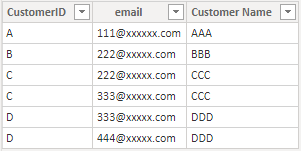
I build two tables like yours to have a test.
Data Table:
User Table (It has been transformed in Power Query editor by Split.):
Build a many to many relationship between CustomerID columns in two tables.
Then Add two Dax expression in Mange roles.
In Data table:
[CustomerID] =
CALCULATE (
MAX(Data[CustomerID]),
FILTER (
User,
User[email] = USERPRINCIPALNAME()
&& User[CustomerID] = Data[CustomerID]
)
)In User table:
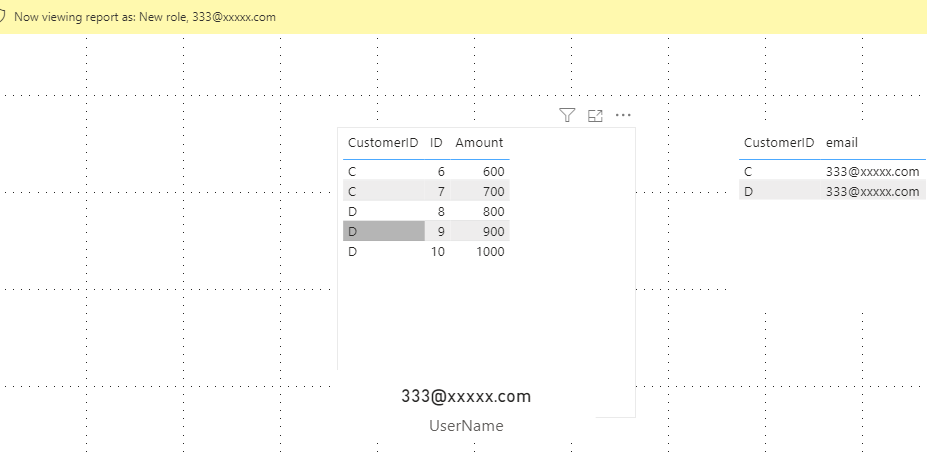
[email] = USERPRINCIPALNAME()Let's use view as to see the result.
You can download the pbix file from this link: Dynamic RLS with multiple USERPRINCIPALNAME()
Best Regards,
Rico Zhou
If this post helps, then please consider Accept it as the solution to help the other members find it more quickly.
I build two tables like yours to have a test.
Data Table:
User Table (It has been transformed in Power Query editor by Split.):
Build a many to many relationship between CustomerID columns in two tables.
Then Add two Dax expression in Mange roles.
In Data table:
[CustomerID] =
CALCULATE (
MAX(Data[CustomerID]),
FILTER (
User,
User[email] = USERPRINCIPALNAME()
&& User[CustomerID] = Data[CustomerID]
)
)In User table:
[email] = USERPRINCIPALNAME()Let's use view as to see the result.
You can download the pbix file from this link: Dynamic RLS with multiple USERPRINCIPALNAME()
Best Regards,
Rico Zhou
If this post helps, then please consider Accept it as the solution to help the other members find it more quickly.
@hideakisuzuki01 , c is having same email ID as B ? Same for D same email ID as C.
Yes, B and C has the same email, because I want both users (222@xxxxx.com and 333@xxxxx.com) to have access to Company B and C`s data.
Does it make sense ?
Check out the April 2026 Power BI update to learn about new features.
Sign up to receive a private message when registration opens and key events begin.
If you have recently started exploring Fabric, we'd love to hear how it's going. Your feedback can help with product improvements.
| User | Count |
|---|---|
| 36 | |
| 33 | |
| 27 | |
| 24 | |
| 18 |
| User | Count |
|---|---|
| 66 | |
| 50 | |
| 33 | |
| 24 | |
| 24 |