Get certified for free when you join Fabric Data Days 2026 and dive into Fabric, Power BI, SQL, AI, and other essential data skills.
Join nowTry your skills in the Power BI Dataviz World Championship! Round one ends June 26. Join now
Hi,
Need a solution/work-around from the power bi experts for the following scenario:
For a dashboard with huge data in power bi (no external coding used) and until now we have implemented user authentication with dynamic rls based on 1 user (email) -> 1 role (either a Plan or Pol).
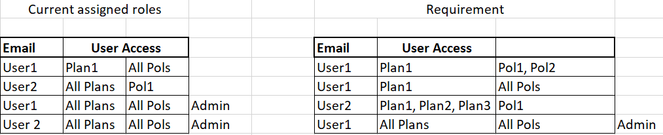
Requirement: There are multiple Plans and Pols and we need to assign multiple roles to a single user based on different combinations like below:
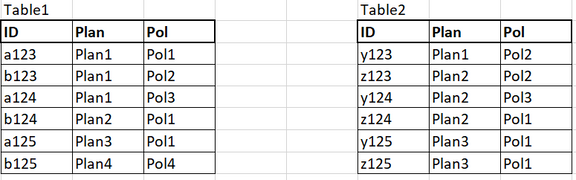
The data is in the below format. There is no relation between the tables and there is no hierarchy between Plan and Pol.
Help from expertise is much appreciated
@amitchandak @FreemanZ @Greg_Deckler @lbendlin @tamerj1
@Anonymous , I usually Create a table like this and merge it with Assigned user
| COl1 | COl2 |
| All Pols | Pol1 |
| All Pols | Pol2 |
| All Pols | Pol3 |
| Pol1 | Pol1 |
| Pol2 | Pol2 |
| Pol3 | Pol3 |
Same I can DO with all plan.
If needed You can create a combine column and join the table for RLS
| User | Count |
|---|---|
| 23 | |
| 19 | |
| 19 | |
| 17 | |
| 11 |
| User | Count |
|---|---|
| 55 | |
| 55 | |
| 41 | |
| 40 | |
| 30 |