Don't miss your chance to take the Fabric Data Engineer (DP-600) exam for FREE! Find out how by attending the DP-600 session on April 23rd (pacific time), live or on-demand.
Learn moreNext up in the FabCon + SQLCon recap series: The roadmap for Microsoft SQL and Maximizing Developer experiences in Fabric. All sessions are available on-demand after the live show. Register now
Hi,
Need a solution/work-around from the power bi experts for the following scenario:
For a dashboard with huge data in power bi (no external coding used) and until now we have implemented user authentication with dynamic rls based on 1 user (email) -> 1 role (either a Plan or Pol).
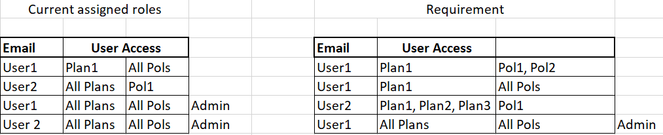
Requirement: There are multiple Plans and Pols and we need to assign multiple roles to a single user based on different combinations like below:
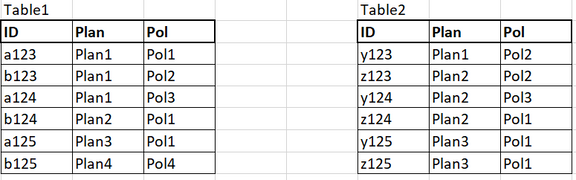
The data is in the below format. There is no relation between the tables and there is no hierarchy between Plan and Pol.
Help from expertise is much appreciated
@amitchandak @FreemanZ @Greg_Deckler @lbendlin @tamerj1
@Anonymous , I usually Create a table like this and merge it with Assigned user
| COl1 | COl2 |
| All Pols | Pol1 |
| All Pols | Pol2 |
| All Pols | Pol3 |
| Pol1 | Pol1 |
| Pol2 | Pol2 |
| Pol3 | Pol3 |
Same I can DO with all plan.
If needed You can create a combine column and join the table for RLS
If you have recently started exploring Fabric, we'd love to hear how it's going. Your feedback can help with product improvements.
A new Power BI DataViz World Championship is coming this June! Don't miss out on submitting your entry.
Share feedback directly with Fabric product managers, participate in targeted research studies and influence the Fabric roadmap.
| User | Count |
|---|---|
| 48 | |
| 43 | |
| 39 | |
| 19 | |
| 17 |
| User | Count |
|---|---|
| 69 | |
| 63 | |
| 32 | |
| 31 | |
| 23 |