Join us at FabCon Atlanta from March 16 - 20, 2026, for the ultimate Fabric, Power BI, AI and SQL community-led event. Save $200 with code FABCOMM.
Register now!Learn from the best! Meet the four finalists headed to the FINALS of the Power BI Dataviz World Championships! Register now
Hi,
Need a solution/work-around from the power bi experts for the following scenario:
For a dashboard with huge data in power bi (no external coding used) and until now we have implemented user authentication with dynamic rls based on 1 user (email) -> 1 role (either a Plan or Pol).
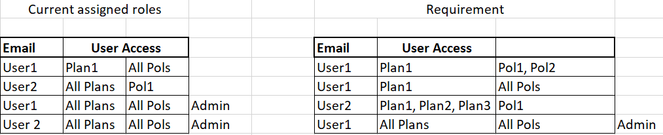
Requirement: There are multiple Plans and Pols and we need to assign multiple roles to a single user based on different combinations like below:
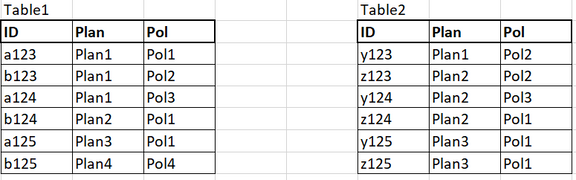
The data is in the below format. There is no relation between the tables and there is no hierarchy between Plan and Pol.
Help from expertise is much appreciated
@amitchandak @FreemanZ @Greg_Deckler @lbendlin @tamerj1
@Anonymous , I usually Create a table like this and merge it with Assigned user
| COl1 | COl2 |
| All Pols | Pol1 |
| All Pols | Pol2 |
| All Pols | Pol3 |
| Pol1 | Pol1 |
| Pol2 | Pol2 |
| Pol3 | Pol3 |
Same I can DO with all plan.
If needed You can create a combine column and join the table for RLS
Share feedback directly with Fabric product managers, participate in targeted research studies and influence the Fabric roadmap.
Check out the February 2026 Power BI update to learn about new features.
| User | Count |
|---|---|
| 61 | |
| 55 | |
| 39 | |
| 16 | |
| 15 |
| User | Count |
|---|---|
| 93 | |
| 84 | |
| 33 | |
| 31 | |
| 25 |