Get certified for free when you join Fabric Data Days 2026 and dive into Fabric, Power BI, SQL, AI, and other essential data skills.
Join nowJuly 7 - July 17 | Round 2 of the Power BI Dataviz World Championships. Don't miss your chance! Learn more
Hi Team,
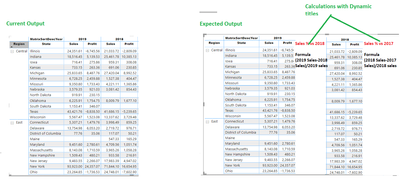
Below is the matrix. I would like to get the dynamic measures which is depending upon the the field year.
Ex: I want to create a calculation % Sales Vs 2018 where the formula is (2019 Sales-2018 Sales)/2019 Sales. This can be done with DAX. My requirement is the name of the measures should be dynamic such as % Sales Vs 2018, % Sales Vs 2017 etc., I added the current output vs expected output below. I also attached the pbix file. https://1drv.ms/u/s!Ao1Y41keMwfAcgZ9w3oyHU_NiOA
I also highlighted the calculations in RED in below snapshot.
Could you help me on this.
Solved! Go to Solution.
Hi @BSM1985 ,
You cannot directly make the change of a measure name in any visualizaiton however thinking outside the box this can be possible, what I di was the following:
Sales Measure Table = UNION(DISTINCT(DateDim[Year]) , ROW("Matrix", "Sales"), ROW("Matrix", "Profit"))
DinamicName = IF('Sales Measure Table'[Year] in {"Sales", "Profit"}, 'Sales Measure Table'[Year],"Sales % vs " & CONVERT('Sales Measure Table'[Year], INTEGER) - 1)
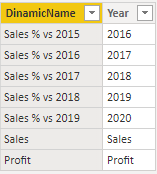
Variatation vs py =
VAR Total_sales =
SUM ( Orders[Sales] )
VAR Previous_year =
CALCULATE (
SUM ( Orders[Sales] ),
FILTER ( ALL ( DateDim ), DateDim[Year] = MAX ( DateDim[Year] ) - 1 )
)
VAR result =
DIVIDE ( ( Total_sales - Previous_year ), Total_sales )
RETURN
result
MatrixValues =
SWITCH (
TRUE (),
SELECTEDVALUE ( 'Sales Measure Table'[Year] ) = "Sales", SUM ( Orders[Sales] ),
SELECTEDVALUE ( 'Sales Measure Table'[Year] ) = "Profit", SUM ( Orders[Profit] ),
SELECTEDVALUE ( 'Sales Measure Table'[Year] )
= FORMAT ( SELECTEDVALUE ( DateDim[YearMatrix] ), "#" ),
IF (
[Variatation vs py] = BLANK ()
|| SELECTEDVALUE ( DateDim[YearMatrix] )
= MINX ( ALL ( DateDim[YearMatrix] ), DateDim[YearMatrix] ),
BLANK (),
FORMAT ( [Variatation vs py], "#.00%" )
)
)
Result below and in attach PBIX file:
Regards
Miguel Félix
Proud to be a Super User!
Check out my blog: Power BI em PortuguêsHi @BSM1985 ,
You cannot directly make the change of a measure name in any visualizaiton however thinking outside the box this can be possible, what I di was the following:
Sales Measure Table = UNION(DISTINCT(DateDim[Year]) , ROW("Matrix", "Sales"), ROW("Matrix", "Profit"))
DinamicName = IF('Sales Measure Table'[Year] in {"Sales", "Profit"}, 'Sales Measure Table'[Year],"Sales % vs " & CONVERT('Sales Measure Table'[Year], INTEGER) - 1)
Variatation vs py =
VAR Total_sales =
SUM ( Orders[Sales] )
VAR Previous_year =
CALCULATE (
SUM ( Orders[Sales] ),
FILTER ( ALL ( DateDim ), DateDim[Year] = MAX ( DateDim[Year] ) - 1 )
)
VAR result =
DIVIDE ( ( Total_sales - Previous_year ), Total_sales )
RETURN
result
MatrixValues =
SWITCH (
TRUE (),
SELECTEDVALUE ( 'Sales Measure Table'[Year] ) = "Sales", SUM ( Orders[Sales] ),
SELECTEDVALUE ( 'Sales Measure Table'[Year] ) = "Profit", SUM ( Orders[Profit] ),
SELECTEDVALUE ( 'Sales Measure Table'[Year] )
= FORMAT ( SELECTEDVALUE ( DateDim[YearMatrix] ), "#" ),
IF (
[Variatation vs py] = BLANK ()
|| SELECTEDVALUE ( DateDim[YearMatrix] )
= MINX ( ALL ( DateDim[YearMatrix] ), DateDim[YearMatrix] ),
BLANK (),
FORMAT ( [Variatation vs py], "#.00%" )
)
)
Result below and in attach PBIX file:
Regards
Miguel Félix
Proud to be a Super User!
Check out my blog: Power BI em PortuguêsThe solution you presented is awsome.
I would like to ask if is possible to sort the table by one of the measures, like "Variatation vs 2018"?
I have tried, but i can't find a way to do this.
Join us in Barcelona for FabCon and SQLCon, the Fabric, Power BI, SQL, and AI community event. Save €200 with code FABCMTY200.
Join Fabric Data Days 2026: 60 days of free live/on-demand sessions, challenges, study groups, and certification opportunities.
| User | Count |
|---|---|
| 23 | |
| 22 | |
| 18 | |
| 17 | |
| 13 |
| User | Count |
|---|---|
| 63 | |
| 44 | |
| 42 | |
| 40 | |
| 39 |