This time we’re going bigger than ever. Fabric, Power BI, SQL, AI and more. We're covering it all. You won't want to miss it.
Learn moreLevel up your Power BI skills this month - build one visual each week and tell better stories with data! Get started
Hi Team,
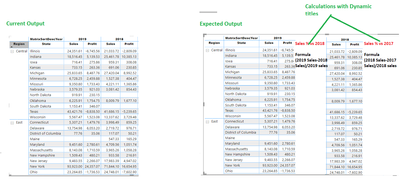
Below is the matrix. I would like to get the dynamic measures which is depending upon the the field year.
Ex: I want to create a calculation % Sales Vs 2018 where the formula is (2019 Sales-2018 Sales)/2019 Sales. This can be done with DAX. My requirement is the name of the measures should be dynamic such as % Sales Vs 2018, % Sales Vs 2017 etc., I added the current output vs expected output below. I also attached the pbix file. https://1drv.ms/u/s!Ao1Y41keMwfAcgZ9w3oyHU_NiOA
I also highlighted the calculations in RED in below snapshot.
Could you help me on this.
Solved! Go to Solution.
Hi @BSM1985 ,
You cannot directly make the change of a measure name in any visualizaiton however thinking outside the box this can be possible, what I di was the following:
Sales Measure Table = UNION(DISTINCT(DateDim[Year]) , ROW("Matrix", "Sales"), ROW("Matrix", "Profit"))
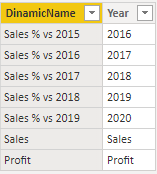
DinamicName = IF('Sales Measure Table'[Year] in {"Sales", "Profit"}, 'Sales Measure Table'[Year],"Sales % vs " & CONVERT('Sales Measure Table'[Year], INTEGER) - 1)
Variatation vs py =
VAR Total_sales =
SUM ( Orders[Sales] )
VAR Previous_year =
CALCULATE (
SUM ( Orders[Sales] ),
FILTER ( ALL ( DateDim ), DateDim[Year] = MAX ( DateDim[Year] ) - 1 )
)
VAR result =
DIVIDE ( ( Total_sales - Previous_year ), Total_sales )
RETURN
result
MatrixValues =
SWITCH (
TRUE (),
SELECTEDVALUE ( 'Sales Measure Table'[Year] ) = "Sales", SUM ( Orders[Sales] ),
SELECTEDVALUE ( 'Sales Measure Table'[Year] ) = "Profit", SUM ( Orders[Profit] ),
SELECTEDVALUE ( 'Sales Measure Table'[Year] )
= FORMAT ( SELECTEDVALUE ( DateDim[YearMatrix] ), "#" ),
IF (
[Variatation vs py] = BLANK ()
|| SELECTEDVALUE ( DateDim[YearMatrix] )
= MINX ( ALL ( DateDim[YearMatrix] ), DateDim[YearMatrix] ),
BLANK (),
FORMAT ( [Variatation vs py], "#.00%" )
)
)
Result below and in attach PBIX file:
Regards
Miguel Félix
Proud to be a Super User!
Check out my blog: Power BI em PortuguêsHi @BSM1985 ,
You cannot directly make the change of a measure name in any visualizaiton however thinking outside the box this can be possible, what I di was the following:
Sales Measure Table = UNION(DISTINCT(DateDim[Year]) , ROW("Matrix", "Sales"), ROW("Matrix", "Profit"))
DinamicName = IF('Sales Measure Table'[Year] in {"Sales", "Profit"}, 'Sales Measure Table'[Year],"Sales % vs " & CONVERT('Sales Measure Table'[Year], INTEGER) - 1)
Variatation vs py =
VAR Total_sales =
SUM ( Orders[Sales] )
VAR Previous_year =
CALCULATE (
SUM ( Orders[Sales] ),
FILTER ( ALL ( DateDim ), DateDim[Year] = MAX ( DateDim[Year] ) - 1 )
)
VAR result =
DIVIDE ( ( Total_sales - Previous_year ), Total_sales )
RETURN
result
MatrixValues =
SWITCH (
TRUE (),
SELECTEDVALUE ( 'Sales Measure Table'[Year] ) = "Sales", SUM ( Orders[Sales] ),
SELECTEDVALUE ( 'Sales Measure Table'[Year] ) = "Profit", SUM ( Orders[Profit] ),
SELECTEDVALUE ( 'Sales Measure Table'[Year] )
= FORMAT ( SELECTEDVALUE ( DateDim[YearMatrix] ), "#" ),
IF (
[Variatation vs py] = BLANK ()
|| SELECTEDVALUE ( DateDim[YearMatrix] )
= MINX ( ALL ( DateDim[YearMatrix] ), DateDim[YearMatrix] ),
BLANK (),
FORMAT ( [Variatation vs py], "#.00%" )
)
)
Result below and in attach PBIX file:
Regards
Miguel Félix
Proud to be a Super User!
Check out my blog: Power BI em PortuguêsThe solution you presented is awsome.
I would like to ask if is possible to sort the table by one of the measures, like "Variatation vs 2018"?
I have tried, but i can't find a way to do this.
Check out the April 2026 Power BI update to learn about new features.
Sign up to receive a private message when registration opens and key events begin.
If you have recently started exploring Fabric, we'd love to hear how it's going. Your feedback can help with product improvements.
| User | Count |
|---|---|
| 36 | |
| 29 | |
| 29 | |
| 21 | |
| 18 |
| User | Count |
|---|---|
| 68 | |
| 39 | |
| 33 | |
| 24 | |
| 23 |