
Get certified for free when you join Fabric Data Days 2026 and dive into Fabric, Power BI, SQL, AI, and other essential data skills.
Join nowJuly 7 - July 17 | Round 2 of the Power BI Dataviz World Championships. Don't miss your chance! Learn more
Hello Everyone,
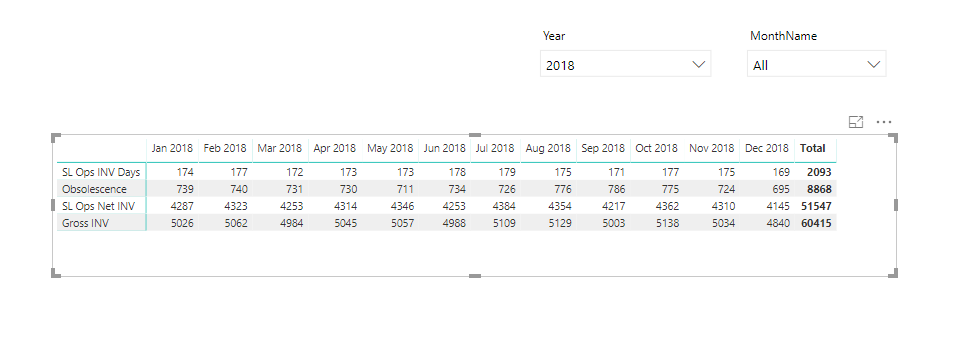
I have a matrix where rows are measures and columns are Dates "Month-Year". I want to find a way that when a month is selected in filter. Matrix will show Current Month "Selection", CM-1, CM-3, CM-6 and CM-9. And this need to be dynamically changed along filtering.
Thanks in advance.If Sep 2018 is selected, Matrix needs to show Sep18, Aug18,Jun18, Mar18 and Dec17 in this example.
Solved! Go to Solution.
I was able to do by using Segmentation table for dates then use VAR selection.
Hello @ritanoori, I believe I was able to do what you want with 2 disconnected tables. See Page1, Table8, Table9 and Table10 of attached.
The measure ends up like:
Measure 5 =
VAR __selectedMonth = MAX('Table9'[Month])
VAR __currentMonth = MAX('Table10'[Month])
VAR __show = IF(MONTH(__currentMonth) <= MONTH(__selectedMonth),TRUE(),FALSE())
VAR __sum = SUMX(FILTER('Table8',[Month]=__currentMonth),[Value])
RETURN
IF(__show,__sum,BLANK())
So, get the selected month from Table9, which is the slicer. Get the selected month from Table10, which is the disconnected table used for the Columns. Then, determine if a value should be shown (__show). Calculate the value to be shown (__sum) and then return a value or not.
Thanks Greg, in this case I have to create a measure for each period required and that will keep adding measures to my rows which I don't want. I only want to show the four lines and coulmns changed based on selection.
OK, if you can provide some sample data and expected output that would help. I'm not 100% certain what your setup is in terms of calculations, etc. Are you saying that you have measures in rows? Perhaps a screen shot of how your fields are configured in your matrix.
this is the required output
Yes I have measures in rows and Month-Year coming from date table.
I was able to do by using Segmentation table for dates then use VAR selection.
Join us in Barcelona for FabCon and SQLCon, the Fabric, Power BI, SQL, and AI community event. Save €200 with code FABCMTY200.
Join Fabric Data Days 2026: 60 days of free live/on-demand sessions, challenges, study groups, and certification opportunities.
| User | Count |
|---|---|
| 23 | |
| 22 | |
| 18 | |
| 17 | |
| 13 |
| User | Count |
|---|---|
| 67 | |
| 50 | |
| 46 | |
| 41 | |
| 39 |