Don't miss your chance to take the Fabric Data Engineer (DP-600) exam for FREE! Find out how by watching the DP-600 session on-demand now through April 28th.
Learn moreJoin the FabCon + SQLCon recap series. Up next: Power BI, Real-Time Intelligence, IQ and AI, and Data Factory take center stage. All sessions are available on-demand after the live show. Register now
Hi everybody ! How are you?
I need to do a dynamic histogram where the value is a measure. It is a possible?
Basically, I need a histogram that is based on a measurement and that changes according to the selected date slicer changes.
The example would be as follows:
I have a measurement ranging from -100% to 100% and I need to group stores with values from -100% to 100% in 10% intervals.
Thanks !
Regards!
Solved! Go to Solution.
Hi @Anonymous ,
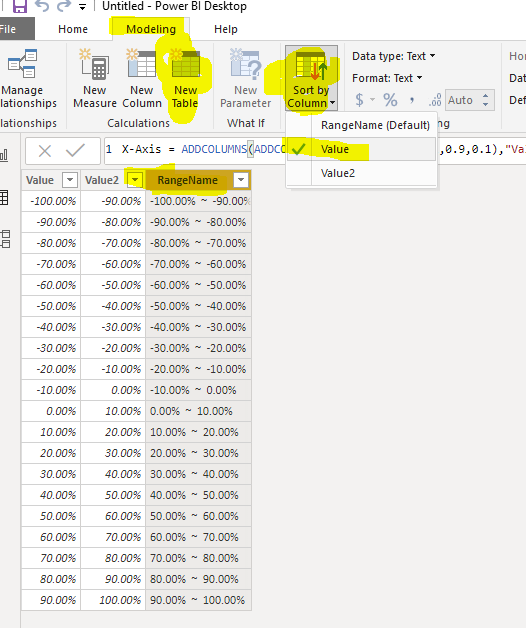
First of all, We can create a calculated table as the Axis:
X-Axis =
ADDCOLUMNS (
ADDCOLUMNS ( GENERATESERIES ( -1, 0.9, 0.1 ), "Value2", [Value] + 0.1 ),
"RangeName", FORMAT ( [Value], "Percent" ) & " ~ "
& FORMAT ( [Value2], "Percent" )
)
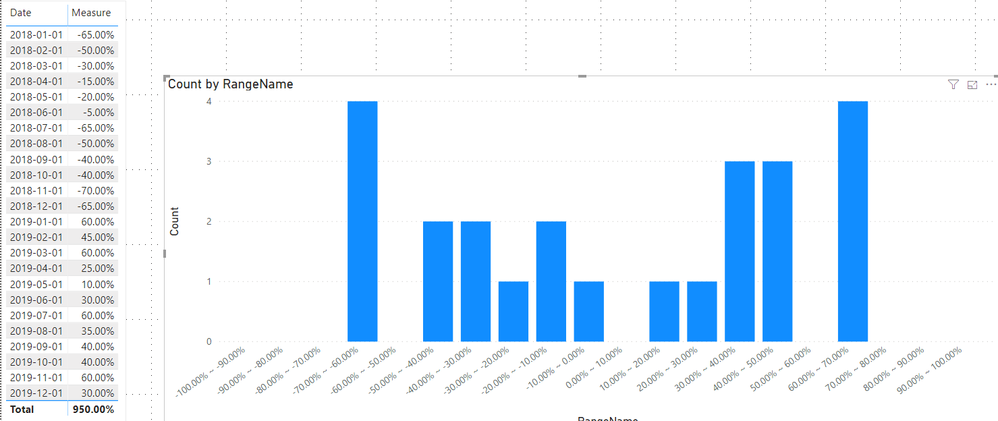
Then we can create a measure to count the value dynamicly
Count =
COUNTROWS (
FILTER (
'Table',
[Measure] >= MIN ( 'X-Axis'[Value] )
&& [Measure] <= MAX ( 'X-Axis'[Value2] )
)
)
If it doesn't meet your requirement, kindly share your sample data and expected result to me if you don't have any Confidential Information. Please upload your files to One Drive and share the link here.
Best regards,
Hi guys,
great and clear example. I have an additional question: I have build a distribution measure as suggested, however it seems to be ignoring any date filters I am applying. Any thoughts how I can make it reactive to changes in the date filter? Good to know the measure draws it's data from a different table than the one the COUNTROWS is applied to.
Hi @Anonymous ,
First of all, We can create a calculated table as the Axis:
X-Axis =
ADDCOLUMNS (
ADDCOLUMNS ( GENERATESERIES ( -1, 0.9, 0.1 ), "Value2", [Value] + 0.1 ),
"RangeName", FORMAT ( [Value], "Percent" ) & " ~ "
& FORMAT ( [Value2], "Percent" )
)
Then we can create a measure to count the value dynamicly
Count =
COUNTROWS (
FILTER (
'Table',
[Measure] >= MIN ( 'X-Axis'[Value] )
&& [Measure] <= MAX ( 'X-Axis'[Value2] )
)
)
If it doesn't meet your requirement, kindly share your sample data and expected result to me if you don't have any Confidential Information. Please upload your files to One Drive and share the link here.
Best regards,
to avoid a value that lies on the edge of a category being counted in both the the lower and higher categories, I recommend changing the count measure from
Count =
COUNTROWS (
FILTER (
'Table',
[Measure] >= MIN ( 'X-Axis'[Value] )
&& [Measure] <= MAX ( 'X-Axis'[Value2] )
)
)
to
Count =
COUNTROWS(
FILTER(
'Table',
[Measure]
> MIN( 'X-Axis'[Value] )
&& [Measure]
<= MAX( 'X-Axis'[Value2] )
)
)
Check out the April 2026 Power BI update to learn about new features.
If you have recently started exploring Fabric, we'd love to hear how it's going. Your feedback can help with product improvements.
A new Power BI DataViz World Championship is coming this June! Don't miss out on submitting your entry.
| User | Count |
|---|---|
| 43 | |
| 37 | |
| 34 | |
| 21 | |
| 16 |
| User | Count |
|---|---|
| 65 | |
| 64 | |
| 31 | |
| 26 | |
| 25 |