Join us at FabCon Atlanta from March 16 - 20, 2026, for the ultimate Fabric, Power BI, AI and SQL community-led event. Save $200 with code FABCOMM.
Register now!Learn from the best! Meet the four finalists headed to the FINALS of the Power BI Dataviz World Championships! Register now
Hi @Anonymous ,
Are you saying that if i select 5% in slicer it will returen both value * (1+5%) and value * (1-5%), if i select 10% in slicer it will returen both value * (1+10%) and value * (1-10%)?
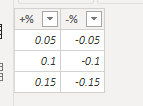
If so you could create a table and measures as below.
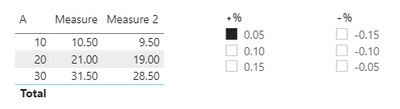
Measure = SELECTEDVALUE('Table'[A])*(1+SELECTEDVALUE(slicer[+%]))
Measure 2 = SELECTEDVALUE('Table'[A])*(1+SELECTEDVALUE(slicer[-%]))
Result would be shown as below.
If i misunderstood your meaning, please show more details.
Best Regards,
Jay
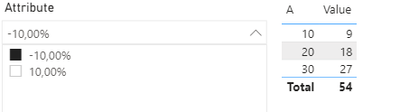
@Anonymous so I did create a table to show something similar to what you have done. Let's say I have a KeyID associated for every record in that table, so I want to first select a single KeyID and when I do that I want a Slicer that can represent lower bound (Measure) and the upper bound (Measure 2)
Something like this
For now, the slicer is not Dynamic, it just gets the Max and Min value of Column A. Would be nice to have it dynamic.
@Anonymous , if the slicer is on % column
measure =
var _max =selectedvalue(slicer[value])
return
calculate(sum(Table[A])*(1+_max))
Absolute number
measure =
var _max =selectedvalue(slicer[value])
return
calculate(sum(Table[A])*((1+_max)//100))
Share feedback directly with Fabric product managers, participate in targeted research studies and influence the Fabric roadmap.
Check out the February 2026 Power BI update to learn about new features.
| User | Count |
|---|---|
| 61 | |
| 59 | |
| 42 | |
| 18 | |
| 15 |
| User | Count |
|---|---|
| 108 | |
| 100 | |
| 39 | |
| 29 | |
| 29 |