cancel
Showing results for 
Search instead for 
Did you mean: 

We've captured the moments from FabCon & SQLCon that everyone is talking about, and we are bringing them to the community, live and on-demand. Starts on April 14th. Register now

Reply
Anonymous
Not applicable

Dynamic Filters

For example, I have a column A with numbers, and I want to calculate +/- X% of Column A. I would like two have two slicers one as a drop for X% (5%, 10%, 15%, etc) and another slicer which will give me the range of (Column A - X% * Column A) -- (Column A + X% * Column A)
Could someone help me with this? TIA!
6 REPLIES 6
Anonymous
Not applicable

Hi @Anonymous ,


Are you saying that if i select 5% in slicer it will returen both value * (1+5%) and value * (1-5%), if i select 10% in slicer it will returen both value * (1+10%) and value * (1-10%)?

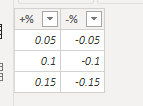
If so you could create a table and measures as below.

Measure = SELECTEDVALUE('Table'[A])*(1+SELECTEDVALUE(slicer[+%]))

Measure 2 = SELECTEDVALUE('Table'[A])*(1+SELECTEDVALUE(slicer[-%]))

1.PNG 

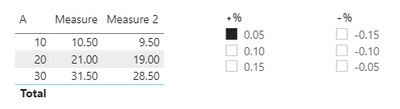
Result would be shown as below.

3.PNG

2.PNG

If i misunderstood your meaning, please show more details.


Best Regards,

Jay

Anonymous
Not applicable

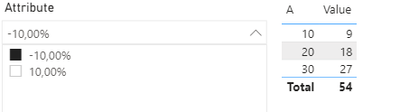
@Anonymous so I did create a table to show something similar to what you have done. Let's say I have a KeyID associated for every record in that table, so I want to first select a single KeyID and when  I do that I want a Slicer that can represent  lower bound (Measure) and the upper bound (Measure 2)


Something like this


For now, the slicer is not Dynamic, it just gets the Max and Min value of Column A. Would be nice to have it dynamic.


Anonymous
Not applicable

image.png

amitchandak
Super User
Super User

@Anonymous , Can you share sample data and sample output in table format?

Share with Power BI Enthusiasts: Full Power BI Video (20 Hours) YouTube
Microsoft Fabric Series 60+ Videos YouTube
Microsoft Fabric Hindi End to End YouTube
Anonymous
Not applicable

Would this suffice @amitchandak ?


A+10%-10%
10119
20

22

18
303327


ashes2076_1-1597823234423.png 

ashes2076_2-1597823256349.png


@Anonymous , if the slicer is on % column


measure =
var _max =selectedvalue(slicer[value])
return
calculate(sum(Table[A])*(1+_max))


Absolute number


measure =
var _max =selectedvalue(slicer[value])
return
calculate(sum(Table[A])*((1+_max)//100))

Share with Power BI Enthusiasts: Full Power BI Video (20 Hours) YouTube
Microsoft Fabric Series 60+ Videos YouTube
Microsoft Fabric Hindi End to End YouTube

Helpful resources

Announcements
New to Fabric survey Carousel

New to Fabric Survey

If you have recently started exploring Fabric, we'd love to hear how it's going. Your feedback can help with product improvements.

Power BI DataViz World Championships carousel

Power BI DataViz World Championships - June 2026

A new Power BI DataViz World Championship is coming this June! Don't miss out on submitting your entry.

Join our Fabric User Panel

Join our Fabric User Panel

Share feedback directly with Fabric product managers, participate in targeted research studies and influence the Fabric roadmap.