
cancel
Showing results for 
Search instead for 
Did you mean: 

The Power BI Data Visualization World Championships is back! Get ahead of the game and start preparing now! Learn more

Reply
ChoiJunghoon
Helper III
Helper III

How to create the new column at the "Direct query Table " with using another table

hi, I have to using the "Direct query table". it is big problem.. 

I don't have any choice about this.  

 "Must Use Direct Query".... 


Table A [Direct Query] 

ID 
A 
A 
B 
B 
C 


Table B [Import ] 

IDTEXT
AX
BY
CZ


I want to Table C as like below 

IDTEXTNew Aadd Column to Connect to  another table
AXAX
AXAX
BYBY
BYBY
CZCZ
1 ACCEPTED SOLUTION
amitchandak
Super User
Super User

@ChoiJunghoon ,

Try this measure with Table A ID and table B text

You can create a power Bi table like this even in direct query mode

addcolumns(crossjoin(selectcolumns(TableA, "IDA",TableA[ID]),TableB),"New COl",[IDA] & [TEXT])

Recommended

https://www.sqlbi.com/articles/from-sql-to-dax-joining-tables/

Share with Power BI Enthusiasts: Full Power BI Video (20 Hours) YouTube
Microsoft Fabric Series 60+ Videos YouTube
Microsoft Fabric Hindi End to End YouTube

View solution in original post

3 REPLIES 3
v-lionel-msft
Community Support
Community Support

Hi @ChoiJunghoon ,


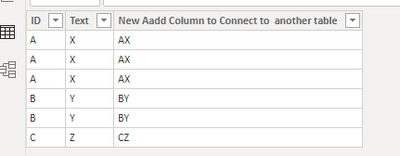
(Note: My tableA has one more row of data than yours, so the result is different.)

v-lionel-msft_0-1597905962156.png

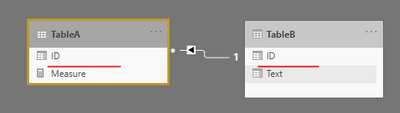
--table relationship

v-lionel-msft_1-1597906277803.png

1. Create a calculated table 'TableC'

TableC = TableA

2. Create two calculated columns.

Text = 
LOOKUPVALUE(
    TableB[Text],
    TableB[ID], 'TableC'[ID]
)
New Aadd Column to Connect to  another table = CONCATENATE( TableC[ID], TableC[Text] )

You can also use ADDCOLUMNS() function to merge formulas together.


Best regards,
Lionel Chen

If this post helps, then please consider Accept it as the solution to help the other members find it more quickly.


Anonymous
Not applicable

Hi @ChoiJunghoon 

Below are the steps I followed to create the required table TableC.

Got o Modelling on the menu bar and select the option as in the screenshot below.

pranit828_0-1597814781175.png

and insert the below code in that formula bar that pops up.


TableC = addcolumns(crossjoin(selectcolumns(TableA, "ID",TableA[ID]),'TableB'),"New Aadd Column to Connect to  another table",CONCATENATE('TableB'[ID],TableB[TEXT]))


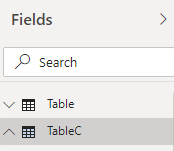
And you will see a new table on the Fields section.

pranit828_1-1597814976264.png

amitchandak
Super User
Super User

@ChoiJunghoon ,

Try this measure with Table A ID and table B text

You can create a power Bi table like this even in direct query mode

addcolumns(crossjoin(selectcolumns(TableA, "IDA",TableA[ID]),TableB),"New COl",[IDA] & [TEXT])

Recommended

https://www.sqlbi.com/articles/from-sql-to-dax-joining-tables/

Share with Power BI Enthusiasts: Full Power BI Video (20 Hours) YouTube
Microsoft Fabric Series 60+ Videos YouTube
Microsoft Fabric Hindi End to End YouTube

Helpful resources

Announcements
November Power BI Update Carousel

Power BI Monthly Update - November 2025

Check out the November 2025 Power BI update to learn about new features.

Fabric Data Days Carousel

Fabric Data Days

Advance your Data & AI career with 50 days of live learning, contests, hands-on challenges, study groups & certifications and more!

FabCon Atlanta 2026 carousel

FabCon Atlanta 2026

Join us at FabCon Atlanta, March 16-20, for the ultimate Fabric, Power BI, AI and SQL community-led event. Save $200 with code FABCOMM.

Top Solution Authors
Top Kudoed Authors