This time we’re going bigger than ever. Fabric, Power BI, SQL, AI and more. We're covering it all. You won't want to miss it.
Learn moreDid you hear? There's a new SQL AI Developer certification (DP-800). Start preparing now and be one of the first to get certified. Register now
<PBI noob here> Please help!
Requirement:
Need only Direct Query
I should have the ability to select a single date from a slicer / calendar type of visual in the report
This should be passed to the datasource and give me only the relevant rows.
The datasource table/view doesnt have a single date field instead it has 2 columns "Start Date" and "End Date". Condition that needs to be applied is -- the selected date should fall between these two dates.
Example:
My table in the datasource
| Start Date | End Date | X |
| 1/1/2022 | 1/3/2022 | A |
| 1/2/2022 | 1/4/2022 | B |
| 1/3/2022 | 1/5/2022 | C |
| 1/4/2022 | 1/15/2022 | D |
1/2/2022 | 1/13/2022 | E |
| 1/5/2022 | 1/7/2022 | F |
| 1/7/2022 | 1/22/2022 | G |
| 1/8/2022 | 1/9/2022 | H |
My selection in the PowerBI report (slicer )(Direct Query mode)
Selected Date: 1/6/2022
Result in the PowerBI report visual
| Start Date | End Date | X |
| 1/4/2022 | 1/15/2022 | D |
1/2/2022 | 1/13/2022 | E |
| 1/5/2022 | 1/7/2022 | F |
How can I achieve this ? @amitchandak @Greg_Deckler @Jihwan_Kim @d_gosbell @tamerj1 @lbendlin
Solved! Go to Solution.
Hi,
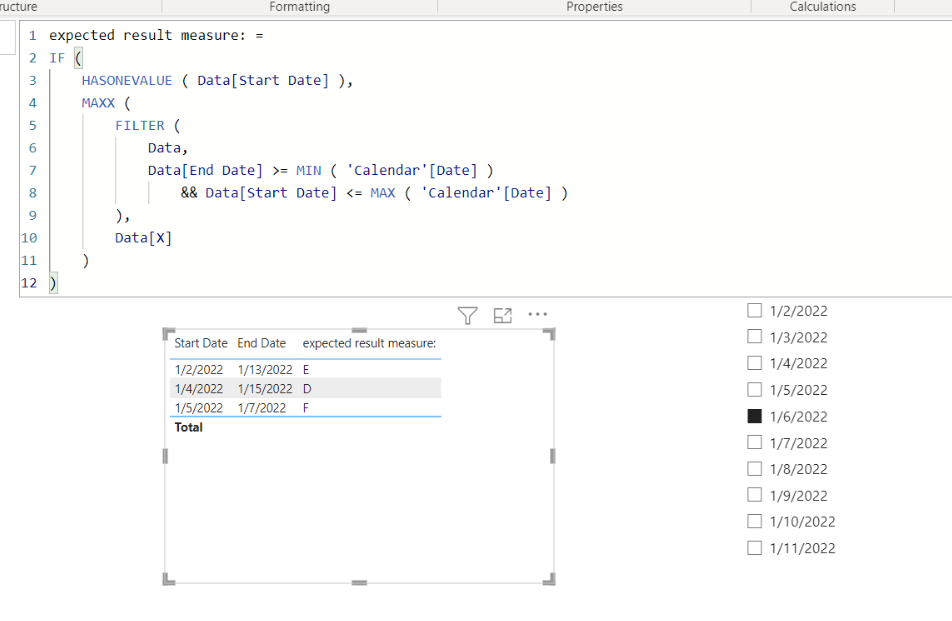
Please check the below picture and the attached pbix file whether it suits your requirement.
expected result measure: =
IF (
HASONEVALUE ( Data[Start Date] ),
MAXX (
FILTER (
Data,
Data[End Date] >= MIN ( 'Calendar'[Date] )
&& Data[Start Date] <= MAX ( 'Calendar'[Date] )
),
Data[X]
)
)
Hi @Anonymous
please place the following measure in the filter pane on the table visual and select 'is not blank' then apply the filter
Filter Measure =
COUNTROWS (
FILTER (
'Table',
'Table'[StartDate] <= SELECTEDVALUE ( 'Calendar'[Date] )
&& 'Table'[EndDate] >= SELECTEDVALUE ( 'Calendar'[Date] )
)
)
Hi,
Please check the below picture and the attached pbix file whether it suits your requirement.
expected result measure: =
IF (
HASONEVALUE ( Data[Start Date] ),
MAXX (
FILTER (
Data,
Data[End Date] >= MIN ( 'Calendar'[Date] )
&& Data[Start Date] <= MAX ( 'Calendar'[Date] )
),
Data[X]
)
)
@Anonymous , if you create a measure and use that in visual or visual level filter
var _max = maxx(allselected(Date), Date[Date])
return
countx(Filter(Table, Table[Start Date] <= _max && Table[End Date] >=_max), [X])
or explore Dynamic M parameter
https://blog.crossjoin.co.uk/2020/10/25/why-im-excited-about-dynamic-m-parameters-in-power-bi/
Check out the April 2026 Power BI update to learn about new features.
If you have recently started exploring Fabric, we'd love to hear how it's going. Your feedback can help with product improvements.
| User | Count |
|---|---|
| 36 | |
| 32 | |
| 31 | |
| 21 | |
| 15 |
| User | Count |
|---|---|
| 68 | |
| 57 | |
| 31 | |
| 29 | |
| 22 |