cancel
Showing results for 
Search instead for 
Did you mean: 

July 7 - July 17 | Round 2 of the Power BI Dataviz World Championships. Don't miss your chance! Learn more

Reply
Anonymous
Not applicable

Dynamic Column


Hi All,


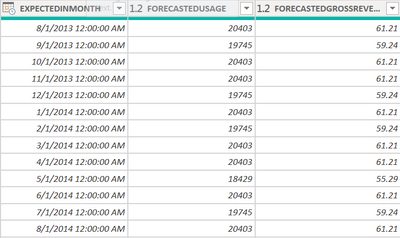
I have the three coluns in my report mentioned below:


Is there a way that I can tranform them so that the end result can look like a column1 : ForecastedGrossRevenue Jan'2013, column 2: ForecastedGrossRevenue Feb'2013 and so on.


I want the data to be shown horizontally.


Himanshu_13_0-1616595744731.png


Regards,

Himanshu

1 ACCEPTED SOLUTION

Hi, @Anonymous 

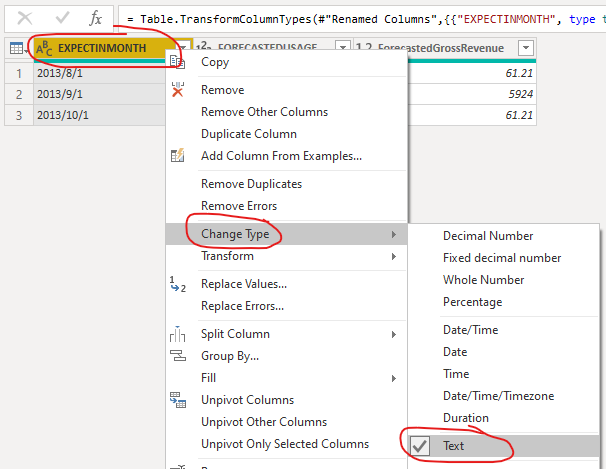
Sorry, I just missed one step before creating the custom column, you should first go to change the type of the column [EXPECTINMONTH] to “Text”:

v-robertq-msft_0-1617155147523.png


Then you can add the custom column and check if it can work, you should also make sure the column name is same as yours in the expression.


Best Regards,

Community Support Team _Robert Qin

If this post helps, then please consider Accept it as the solution to help the other members find it more quickly.

View solution in original post

4 REPLIES 4
v-robertq-msft
Community Support
Community Support

Hi, @Anonymous 

According to your description, I can roughly understand your requirement, I think you can achieve this in the Power Query editor, you can try my steps:

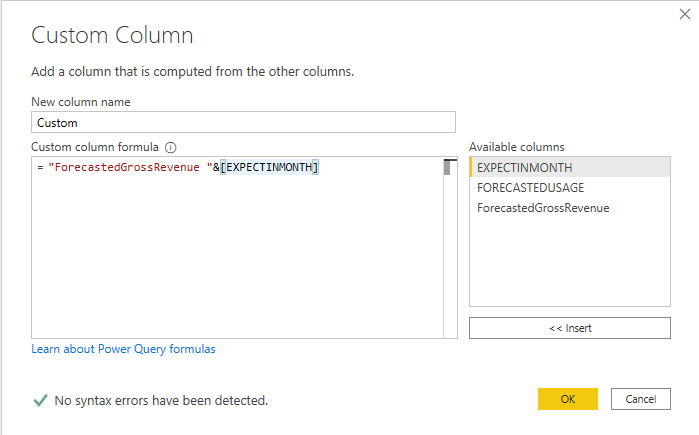
  1. Create a custom column like this:

v-robertq-msft_0-1617010064121.png


  1. Remove other columns except these two columns, then click “Piovit columns” and select like this:
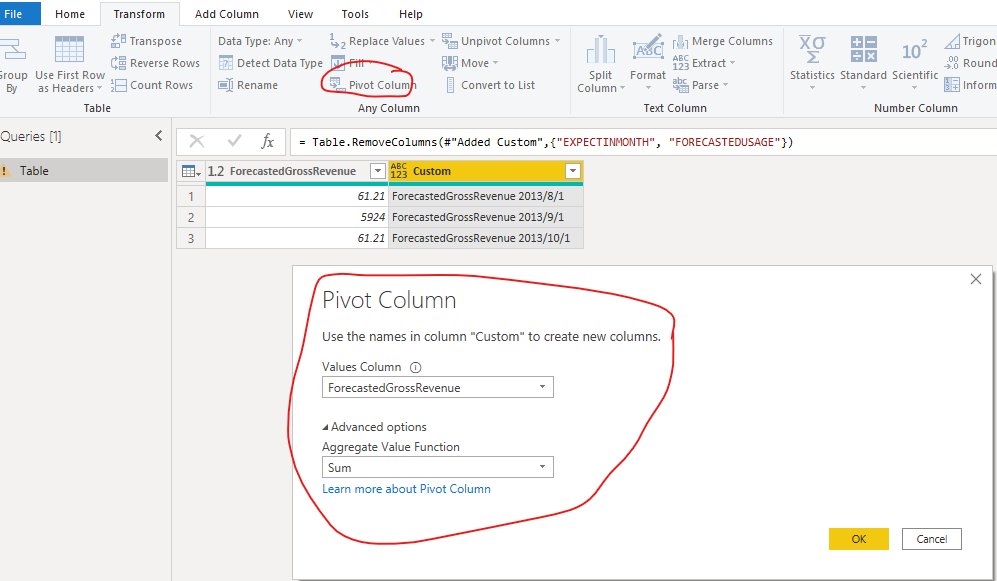
v-robertq-msft_1-1617010064128.png


  1. Then click “Apply and close”, and you can get what you want, like this:
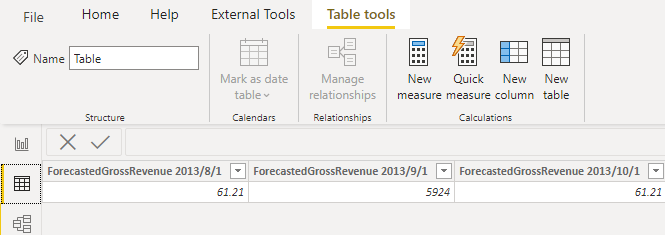
v-robertq-msft_2-1617010064130.png


This is my M code in the advanced editor:

let
    Source = Table.FromRows(Json.Document(Binary.Decompress(Binary.FromText("i45WMjIwNNa10DVU0gEyTQyMgbSZoZ6RoVKsDlTSEixpaGluYgqkTS11jEwQkoYG2LTGAgA=", BinaryEncoding.Base64), Compression.Deflate)), let _t = ((type nullable text) meta [Serialized.Text = true]) in type table [EXPECTINMONTH = _t, FORECASTEDUSAGE = _t, ForecastedGrossRevenue.1 = _t]),
    #"Changed Type" = Table.TransformColumnTypes(Source,{{"EXPECTINMONTH", type date}, {"FORECASTEDUSAGE", Int64.Type}, {"ForecastedGrossRevenue.1", type number}}),
    #"Renamed Columns" = Table.RenameColumns(#"Changed Type",{{"ForecastedGrossRevenue.1", "ForecastedGrossRevenue"}}),
    #"Changed Type1" = Table.TransformColumnTypes(#"Renamed Columns",{{"EXPECTINMONTH", type text}}),
    #"Added Custom" = Table.AddColumn(#"Changed Type1", "Custom", each "ForecastedGrossRevenue "&[EXPECTINMONTH]),
    #"Removed Columns" = Table.RemoveColumns(#"Added Custom",{"EXPECTINMONTH", "FORECASTEDUSAGE"}),
    #"Pivoted Column" = Table.Pivot(#"Removed Columns", List.Distinct(#"Removed Columns"[Custom]), "Custom", "ForecastedGrossRevenue", List.Sum)
in
    #"Pivoted Column"

You can download my test pbix file here


If this result is not what you want, you can post some sample data(without sensitive data) and your expected result.

How to Get Your Question Answered Quickly 


Best Regards,

Community Support Team _Robert Qin

If this post helps, then please consider Accept it as the solution to help the other members find it more quickly.

Anonymous
Not applicable

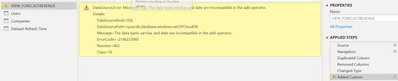
I'm getting an error while creating the custom column.


Himanshu_13_0-1617098233729.png


Hi, @Anonymous 

Sorry, I just missed one step before creating the custom column, you should first go to change the type of the column [EXPECTINMONTH] to “Text”:

v-robertq-msft_0-1617155147523.png


Then you can add the custom column and check if it can work, you should also make sure the column name is same as yours in the expression.


Best Regards,

Community Support Team _Robert Qin

If this post helps, then please consider Accept it as the solution to help the other members find it more quickly.

amitchandak
Super User
Super User

@Anonymous , One Option, is unpivot the last two columns

https://radacad.com/pivot-and-unpivot-with-power-bi


Second is in matrix use "Show on row", But that will give , Feb 2021, Revene

Share with Power BI Enthusiasts: Full Power BI Video (20 Hours) YouTube
Microsoft Fabric Series 60+ Videos YouTube
Microsoft Fabric Hindi End to End YouTube

Helpful resources

Announcements
FabCon and SQLCon Barcelona 2026

FabCon & SQLCon – Barcelona 2026

Join us in Barcelona for FabCon and SQLCon, the Fabric, Power BI, SQL, and AI community event. Save €200 with code FABCMTY200.

60 days of Data Days Carousel

Data Days 2026

Join Fabric Data Days 2026: 60 days of free live/on-demand sessions, challenges, study groups, and certification opportunities.

Power BI DataViz World Championships carousel

Power BI DataViz World Championships - June 2026

A new Power BI DataViz World Championship is coming this June! Don't miss out on submitting your entry.