Join us at FabCon Atlanta from March 16 - 20, 2026, for the ultimate Fabric, Power BI, AI and SQL community-led event. Save $200 with code FABCOMM.
Register now!The Power BI Data Visualization World Championships is back! Get ahead of the game and start preparing now! Learn more
Hello all,
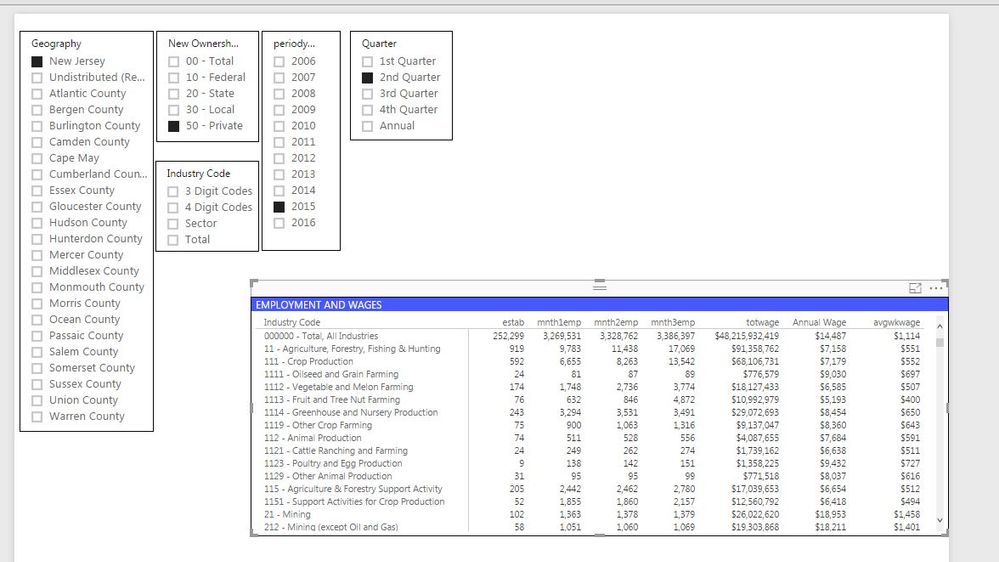
I have a question regarding column name changes. I am trying to build a report that will give quarterly data and would like the month names in the matrix column headers to change accordingly.
For example:
when Q1 then mnth1=Jan, mnth2 = Feb, mnth3 = March
when Q3 then mnth1= Jul, mnth2 = Aug, mnth3 = Sep
Has anyone ran into this before or have an idea on how to do it?
Thank you for the help in advance!
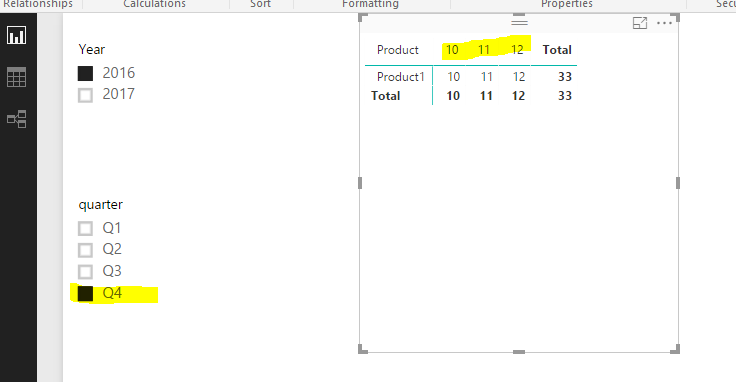
There's no such dynamic column name in Power BI, AFAIK. However you could play matrix visual with some tricky. See mode details in the attached pbix.
Hello @Eric_Zhang,
Sorry for the late response (needed admin's permission), but it didn't work for me. Your example seems to do what I wanted, so it may be due to the way my data is set up and I may just need to change a couple things. Thank you for your help!
The Power BI Data Visualization World Championships is back! Get ahead of the game and start preparing now!
Check out the November 2025 Power BI update to learn about new features.
| User | Count |
|---|---|
| 59 | |
| 46 | |
| 42 | |
| 23 | |
| 17 |
| User | Count |
|---|---|
| 190 | |
| 122 | |
| 96 | |
| 66 | |
| 47 |