cancel
Showing results for 
Search instead for 
Did you mean: 

July 28 - August 9 | Final Round of the Power BI Dataviz World Championships. This is your chance. Learn more

Reply
zbalder
Frequent Visitor

Dynamic Color Direction in KPI

Hey guys, do you have a workaround to dynamicly toggle the "Color Direction" option in a KPI? I have a table where depending on a flag some records will be displayed as "High is good" but some others should display as "Low is good".


Thanks for your help!

5 REPLIES 5
Anonymous
Not applicable

@zbalder,

Could you please share dummy data of your table and display these good records here?

Regards,
Lydia

Hi Lydia,


Here is some sample data, the idea is that the user will have a drop down (slicer) with the codes in it and select each code to see different charts and info about how each code is doing over time, the Dim table has the Code Name, Type of Code and Target Goal, the Fact table has the Amount and the Date.


CodeAmountTarget GoalType of Code
# of registrations54Good is high
# of cancellations31Good is low
# of applications68Good is high
# of rejections21Good is low


So for example when the user selects "# of registrations" I want my KPI to look Green (Good color) as 5 is over the Target and Good is high.

But when the users select "# of cancellations" I want to the KPI to look Red (Bad Color) as 3 is over the Target Goal of 1, or if there were 0 # of cancellations then it will display Green (Good Color) as the value would be under the Target.


Does that make sense?


Thanks! 

Anonymous
Not applicable

@zbalder,

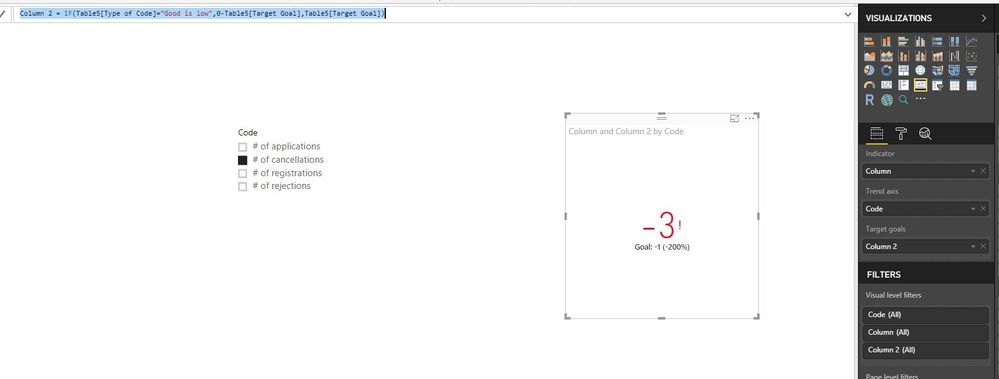
A workaround is to create the following columns in your table and create KPI as follows.

Column = IF(Table[Type of Code]="Good is low",0-Table[Amount],Table[Amount])
Column 2 = IF(Table[Type of Code]="Good is low",0-Table[Target Goal],Table[Target Goal])


1.JPG
Regards,
Lydia

Thanks Lydia, I had thought about this solution, but displaying negative values in the KPI won't be an acceptable visual for the user, I think there is no way, do you know how easy will it be to modify the current KPI Visual to accept a field in the Direction option?

Anonymous
Not applicable

@zbalder,

I can't think other method to achieve your requirement.

Regards,
Lydia

Helpful resources

Announcements
FabCon and SQLCon Barcelona 2026

FabCon & SQLCon – Barcelona 2026

Join us in Barcelona for FabCon and SQLCon, the Fabric, Power BI, SQL, and AI community event. Save €200 with code FABCMTY200.

Fabric Community Sticker Design Challenge Barcelona Carousel

Fabric Community Sticker Challenge - Barcelona 2026

If you love stickers, then you will definitely want to check out our community sticker challenge, Barcelona edition!

July Power BI Update Carousel

Power BI Monthly Update - July 2026

Check out the July 2026 Power BI update to learn about new features.

Power BI DataViz World Championships carousel

Power BI DataViz World Championships - June 2026

A new Power BI DataViz World Championship is coming this June! Don't miss out on submitting your entry.

Top Solution Authors