cancel
Showing results for 
Search instead for 
Did you mean: 

We've captured the moments from FabCon & SQLCon that everyone is talking about, and we are bringing them to the community, live and on-demand. Starts on April 14th. Register now

Reply
adityavighne
Continued Contributor

Dynamic Calculation Based on Date

Hi,


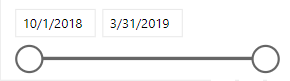
I have a date slicer


1.PNG


I want to select a date range and calculate % change equivalent to the same previous period(days)


eg. if I select 15-31 march I want to compare data with a 1-14 march and then calculate % change


Dimensions - Date and Daily Total Sales


It must be dynamic if I select 45 days then previous 45 days data must be compared with it.

1 ACCEPTED SOLUTION
OwenAuger
Super User
Super User

@adityavighne

Assuming your slicer is based on a Date table, and the measure you want to evaluate is [YourMeasure], you can write a measure that looks something like this:

Change from Prior Period % =
VAR MinDate =
    MIN ( 'Date'[Date] )
VAR NumDaysSelected =
    COUNTROWS ( 'Date' )
// Alternatively MaxDate - MinDate + 1
VAR CurrentMeasure = [YourMeasure] VAR PreviousMeasure = CALCULATE ( [YourMeasure], DATESINPERIOD ( 'Date'[Date], MinDate - 1, - NumDaysSelected, DAY ) ) RETURN DIVIDE ( CurrentMeasure, PreviousMeasure ) - 1

The key feature is using DATESINPERIOD to create a date filter of the same number of days ending the day before the selected period.


Regards,

Owen


Owen Auger
Did I answer your question? Mark my post as a solution!
Blog
LinkedIn

View solution in original post

1 REPLY 1
OwenAuger
Super User
Super User

@adityavighne

Assuming your slicer is based on a Date table, and the measure you want to evaluate is [YourMeasure], you can write a measure that looks something like this:

Change from Prior Period % =
VAR MinDate =
    MIN ( 'Date'[Date] )
VAR NumDaysSelected =
    COUNTROWS ( 'Date' )
// Alternatively MaxDate - MinDate + 1
VAR CurrentMeasure = [YourMeasure] VAR PreviousMeasure = CALCULATE ( [YourMeasure], DATESINPERIOD ( 'Date'[Date], MinDate - 1, - NumDaysSelected, DAY ) ) RETURN DIVIDE ( CurrentMeasure, PreviousMeasure ) - 1

The key feature is using DATESINPERIOD to create a date filter of the same number of days ending the day before the selected period.


Regards,

Owen


Owen Auger
Did I answer your question? Mark my post as a solution!
Blog
LinkedIn

Helpful resources

Announcements
New to Fabric survey Carousel

New to Fabric Survey

If you have recently started exploring Fabric, we'd love to hear how it's going. Your feedback can help with product improvements.

Power BI DataViz World Championships carousel

Power BI DataViz World Championships - June 2026

A new Power BI DataViz World Championship is coming this June! Don't miss out on submitting your entry.

Join our Fabric User Panel

Join our Fabric User Panel

Share feedback directly with Fabric product managers, participate in targeted research studies and influence the Fabric roadmap.

March Power BI Update Carousel

Power BI Community Update - March 2026

Check out the March 2026 Power BI update to learn about new features.