Get certified for free when you join Fabric Data Days 2026 and dive into Fabric, Power BI, SQL, AI, and other essential data skills.
Join nowJuly 7 - July 17 | Round 2 of the Power BI Dataviz World Championships. Don't miss your chance! Learn more
Hello, I'm having an issue trying to dynamically reference another table to pull a value. In table "Listings" I have 1000+ listings that each have a property type, of which there are approximately 10 possible types. In another table "Escrows" I have 1000+ escrows that also have a property type with the same options as listings. I can use calculate to sum the data that I need from the escrow table, but I'm unable to dynamically reference each row to get the correct data. Ideally I would use
CALCULATE(SUM(Escrow[Deal_Amount__c]), Escrow[Filtered Property Type] = Reference to this row's property type in Listing
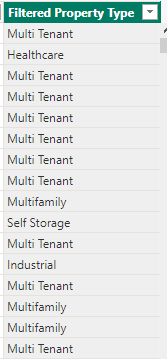
This is how the listing rows look:
I need to change the reference for each row. Any ideas on how/if that's possible?
Solved! Go to Solution.
Hi @bh25 ,
Please have a try.
CALCULATE(SUM(Escrow[Deal_Amount__c]), Escrow[Filtered Property Type] = RELATED(Listings[Property Type]))
The RELATED function returns the related value from another table based on a relationship between the two tables.
Note that you will need to make sure that there is a relationship between the two tables based on the property type column for this to work.
How to Get Your Question Answered Quickly
If it does not help, please provide more details with your desired output and pbix file without privacy information (or some sample data) .
Best Regards
Community Support Team _ Rongtie
If this post helps, then please consider Accept it as the solution to help the other members find it more quickly.
Hi @bh25 ,
Please have a try.
CALCULATE(SUM(Escrow[Deal_Amount__c]), Escrow[Filtered Property Type] = RELATED(Listings[Property Type]))
The RELATED function returns the related value from another table based on a relationship between the two tables.
Note that you will need to make sure that there is a relationship between the two tables based on the property type column for this to work.
How to Get Your Question Answered Quickly
If it does not help, please provide more details with your desired output and pbix file without privacy information (or some sample data) .
Best Regards
Community Support Team _ Rongtie
If this post helps, then please consider Accept it as the solution to help the other members find it more quickly.
@bh25 , new column way
refer 4 ways (related, relatedtable, lookupvalue, sumx/minx/maxx with filter) to copy data from one table to another
https://www.youtube.com/watch?v=Wu1mWxR23jU
https://www.youtube.com/watch?v=czNHt7UXIe8
Measure way
CALCULATE(SUM(Escrow[Deal_Amount__c]), Escrow[Filtered Property Type] =values(Table1[Table[Type]))
Also, consider treatas
https://docs.microsoft.com/en-us/dax/treatas-function
https://www.sqlbi.com/articles/propagate-filters-using-treatas-in-dax/
Join us in Barcelona for FabCon and SQLCon, the Fabric, Power BI, SQL, and AI community event. Save €200 with code FABCMTY200.
Join Data Days 2026: 60 days of free live/on-demand sessions, challenges, study groups, and certification opportunities.
| User | Count |
|---|---|
| 27 | |
| 23 | |
| 18 | |
| 16 | |
| 15 |
| User | Count |
|---|---|
| 62 | |
| 44 | |
| 42 | |
| 37 | |
| 37 |