Join us at FabCon Atlanta from March 16 - 20, 2026, for the ultimate Fabric, Power BI, AI and SQL community-led event. Save $200 with code FABCOMM.
Register now!The Power BI Data Visualization World Championships is back! It's time to submit your entry. Live now!
Hey hi Guy's,
I have created 1 column like 1-1000 numbers, by using generate dax like this
Now I was trying to creating dynamic bucket column based on first column numbers.
2 nd column like first 10 rows are 1-10,
next 10 rows are 10-20
can any one please help me on dynamic bucket column.
regards,
Tom
Solved! Go to Solution.
@Anonymous
A new column on that table like this should work.
Range = CEILING('Table'[Value],10)-9 & "-" & CEILING('Table'[Value],10)
@Anonymous
A new column on that table like this should work.
Range = CEILING('Table'[Value],10)-9 & "-" & CEILING('Table'[Value],10)
hi @jdbuchanan71 ,
Thanks for your dax working fine.
now i want to sort it down order wise.
like 1-10 then 1 and 11-20 then 2
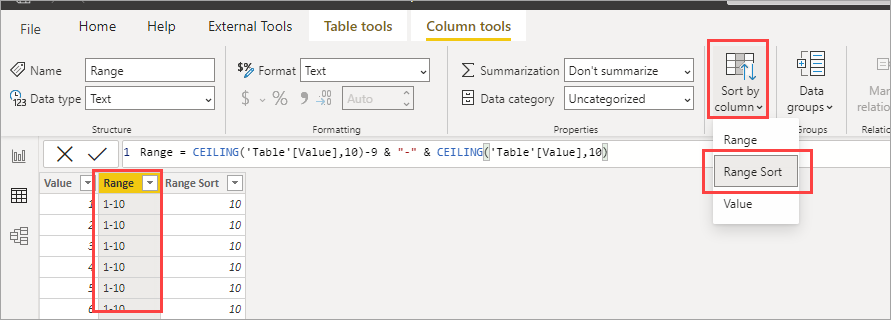
Just add a column like this.
Range Sort = CEILING('Table'[Value],10)
Then set the sort by on Range to Range Sort.
The Power BI Data Visualization World Championships is back! It's time to submit your entry.
Check out the January 2026 Power BI update to learn about new features.
| User | Count |
|---|---|
| 61 | |
| 49 | |
| 39 | |
| 25 | |
| 23 |
| User | Count |
|---|---|
| 142 | |
| 111 | |
| 65 | |
| 38 | |
| 33 |