Join us at FabCon Atlanta from March 16 - 20, 2026, for the ultimate Fabric, Power BI, AI and SQL community-led event. Save $200 with code FABCOMM.
Register now!The Power BI Data Visualization World Championships is back! It's time to submit your entry. Live now!
Hey hi Guy's,
I have created 1 column like 1-1000 numbers, by using generate dax like this
Now I was trying to creating dynamic bucket column based on first column numbers.
2 nd column like first 10 rows are 1-10,
next 10 rows are 10-20
can any one please help me on dynamic bucket column.
regards,
Tom
Solved! Go to Solution.
@Anonymous
A new column on that table like this should work.
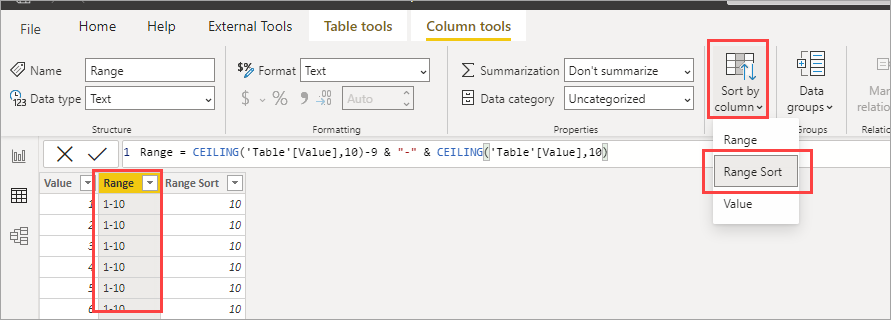
Range = CEILING('Table'[Value],10)-9 & "-" & CEILING('Table'[Value],10)
@Anonymous
A new column on that table like this should work.
Range = CEILING('Table'[Value],10)-9 & "-" & CEILING('Table'[Value],10)
hi @jdbuchanan71 ,
Thanks for your dax working fine.
now i want to sort it down order wise.
like 1-10 then 1 and 11-20 then 2
Just add a column like this.
Range Sort = CEILING('Table'[Value],10)
Then set the sort by on Range to Range Sort.
The Power BI Data Visualization World Championships is back! It's time to submit your entry.
| User | Count |
|---|---|
| 50 | |
| 43 | |
| 36 | |
| 32 | |
| 29 |
| User | Count |
|---|---|
| 129 | |
| 129 | |
| 59 | |
| 48 | |
| 47 |