cancel
Showing results for 
Search instead for 
Did you mean: 

The Power BI Data Visualization World Championships is back! It's time to submit your entry. Live now!

Reply
Anonymous
Not applicable

Dynamic Bucket Column

Hey hi Guy's,


I have created 1 column like 1-1000 numbers, by using generate dax like this


Capture.PNG


Now I was trying to creating dynamic bucket column based on first column numbers.

2 nd column like first 10 rows are 1-10,

                            next 10 rows are 10-20


can any one please help me on dynamic bucket column. 


regards,

Tom

1 ACCEPTED SOLUTION
jdbuchanan71
Super User
Super User

@Anonymous 

A new column on that table like this should work.

Range = CEILING('Table'[Value],10)-9 & "-" & CEILING('Table'[Value],10)

jdbuchanan71_0-1620847103309.png


View solution in original post

3 REPLIES 3
jdbuchanan71
Super User
Super User

@Anonymous 

A new column on that table like this should work.

Range = CEILING('Table'[Value],10)-9 & "-" & CEILING('Table'[Value],10)

jdbuchanan71_0-1620847103309.png


Anonymous
Not applicable

hi @jdbuchanan71 ,


Thanks for your dax working fine.

now i want to sort it down order wise.

like 1-10 then 1 and 11-20 then 2

Tom_3_0-1620847566915.png


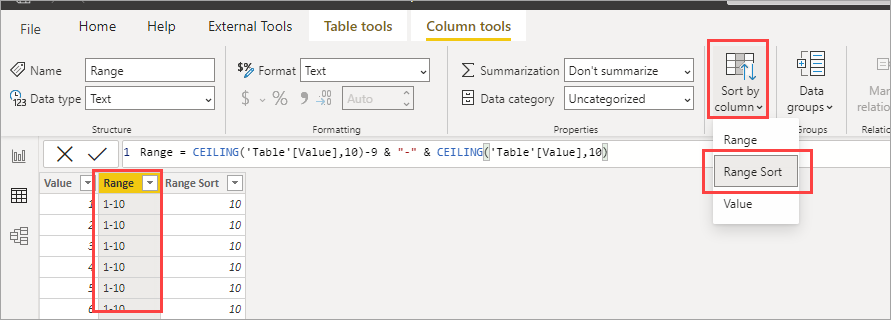
Just add a column like this.

Range Sort = CEILING('Table'[Value],10)

Then set the sort by on Range to Range Sort.

jdbuchanan71_0-1620863151752.png


Helpful resources

Announcements
December 2025 Power BI Update Carousel

Power BI Monthly Update - December 2025

Check out the December 2025 Power BI Holiday Recap!

FabCon Atlanta 2026 carousel

FabCon Atlanta 2026

Join us at FabCon Atlanta, March 16-20, for the ultimate Fabric, Power BI, AI and SQL community-led event. Save $200 with code FABCOMM.