This is best Fabric, Power BI, SQL and AI community event. How do we know? The last event sold out! Save €200 with code FABCMTY200.
Register nowThe Fabric community is upgrading! Read all of the details including the timeline and what you can expect. Learn more
Hi guys!
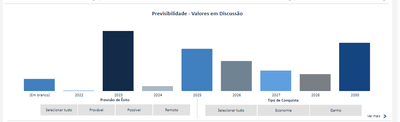
In the following chart, it shows a graph and two filters. "Previsão de Êxito" and "Tipo de Conquista"
I want to change the color of the bars in the chart according to the "Tipo de Conquista" filter.
Example:
When I click over "Economia" it would change to RED, and if I click over "Ganho" it would change to GRAY. (or any other column)
(All bars should change its colors to a single color)
*The Y-axis ("Economia" and "Ganho") are measures
Is it possible?
Solved! Go to Solution.
Hi @tahechadv_2022 ,
You can use the SELECTEDVALUE function pointing to the filter and then based on the result, you choose a color, something like this
var filter_selected = SELECTEDVALUE('column used on the slicer')
return
SWITCH(
TRUE(),
filter_selected = "Economia", "Red",
filter_selected = "Ganho", "Gray",
"#FFFFFF" -- you can also use hex code
)
After creating this measure, you apply a Field Value to the colors, on the path below
Hope it helps,
Regards,
Douglas.
Hi @tahechadv_2022 ,
You can use the SELECTEDVALUE function pointing to the filter and then based on the result, you choose a color, something like this
var filter_selected = SELECTEDVALUE('column used on the slicer')
return
SWITCH(
TRUE(),
filter_selected = "Economia", "Red",
filter_selected = "Ganho", "Gray",
"#FFFFFF" -- you can also use hex code
)
After creating this measure, you apply a Field Value to the colors, on the path below
Hope it helps,
Regards,
Douglas.
Thank-you!
It worked out, for "Economia" and "Ganho"... but
When I click over "Selecionar tudo" (Select all, in english) it returns two colors different colors:
How can I set a specific colors to "Selecionar tudo" (Select all, in english)?
I just solved the problem
Boa!! 😄
You can also use the function ISFILTERED, it returns True or False regarding of the slicer selection.
Abraços,
Douglas.
I didn't understand your logic, can you give me an example?
Join us in Barcelona for FabCon and SQLCon, the Fabric, Power BI, SQL, and AI community event. Save €200 with code FABCMTY200.
| User | Count |
|---|---|
| 23 | |
| 22 | |
| 14 | |
| 14 | |
| 13 |
| User | Count |
|---|---|
| 47 | |
| 39 | |
| 24 | |
| 22 | |
| 20 |