Don't miss your chance to take the Fabric Data Engineer (DP-600) exam for FREE! Find out how by attending the DP-600 session on April 23rd (pacific time), live or on-demand.
Learn moreNext up in the FabCon + SQLCon recap series: The roadmap for Microsoft SQL and Maximizing Developer experiences in Fabric. All sessions are available on-demand after the live show. Register now
Hi guys!
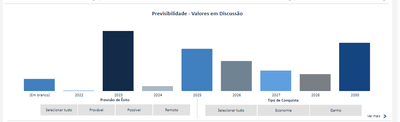
In the following chart, it shows a graph and two filters. "Previsão de Êxito" and "Tipo de Conquista"
I want to change the color of the bars in the chart according to the "Tipo de Conquista" filter.
Example:
When I click over "Economia" it would change to RED, and if I click over "Ganho" it would change to GRAY. (or any other column)
(All bars should change its colors to a single color)
*The Y-axis ("Economia" and "Ganho") are measures
Is it possible?
Solved! Go to Solution.
Hi @tahechadv_2022 ,
You can use the SELECTEDVALUE function pointing to the filter and then based on the result, you choose a color, something like this
var filter_selected = SELECTEDVALUE('column used on the slicer')
return
SWITCH(
TRUE(),
filter_selected = "Economia", "Red",
filter_selected = "Ganho", "Gray",
"#FFFFFF" -- you can also use hex code
)
After creating this measure, you apply a Field Value to the colors, on the path below
Hope it helps,
Regards,
Douglas.
Hi @tahechadv_2022 ,
You can use the SELECTEDVALUE function pointing to the filter and then based on the result, you choose a color, something like this
var filter_selected = SELECTEDVALUE('column used on the slicer')
return
SWITCH(
TRUE(),
filter_selected = "Economia", "Red",
filter_selected = "Ganho", "Gray",
"#FFFFFF" -- you can also use hex code
)
After creating this measure, you apply a Field Value to the colors, on the path below
Hope it helps,
Regards,
Douglas.
Thank-you!
It worked out, for "Economia" and "Ganho"... but
When I click over "Selecionar tudo" (Select all, in english) it returns two colors different colors:
How can I set a specific colors to "Selecionar tudo" (Select all, in english)?
I just solved the problem
Boa!! 😄
You can also use the function ISFILTERED, it returns True or False regarding of the slicer selection.
Abraços,
Douglas.
I didn't understand your logic, can you give me an example?
If you have recently started exploring Fabric, we'd love to hear how it's going. Your feedback can help with product improvements.
A new Power BI DataViz World Championship is coming this June! Don't miss out on submitting your entry.
| User | Count |
|---|---|
| 47 | |
| 44 | |
| 39 | |
| 20 | |
| 15 |
| User | Count |
|---|---|
| 70 | |
| 68 | |
| 32 | |
| 27 | |
| 25 |