cancel
Showing results for 
Search instead for 
Did you mean: 

July 28 - August 9 | Final Round of the Power BI Dataviz World Championships. This is your chance. Learn more

Reply
ESS
Regular Visitor

Duration.Seconds difference between two dates

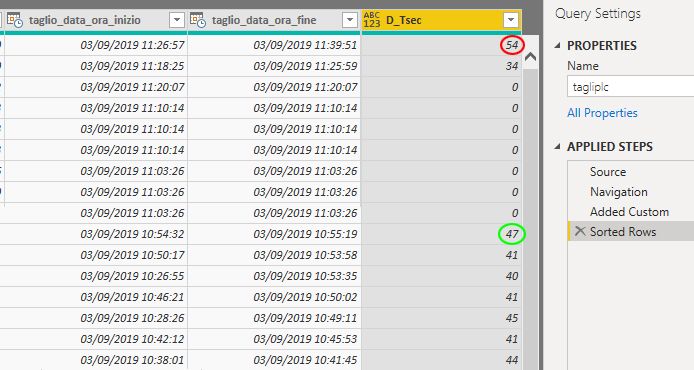
I am trying to extrapolate the seconds between two dates using the function Duration.Seconds


Duration.Seconds([taglio_data_ora_fine]-[taglio_data_ora_inizio])


in some is correct in others not, how do I solve this problem?


error.jpg

1 ACCEPTED SOLUTION
v-eachen-msft
Community Support
Community Support

Hi @ESS ,


I think you want to calculate the difference between two dates. You can try DATEDIFF() function in the DAX.

Column =
DATEDIFF ( 'Table'[taglio_data_ora_fine], 'Table'[taglio_data_ora_inizio], SECOND )

Best Regards,

Eads


If this post helps, then please consider Accept it as the solution to help the other members find it more quickly.

Community Support Team _ Eads
If this post helps, then please consider Accept it as the solution to help the other members find it.

View solution in original post

5 REPLIES 5
v-eachen-msft
Community Support
Community Support

Hi @ESS ,


I think you want to calculate the difference between two dates. You can try DATEDIFF() function in the DAX.

Column =
DATEDIFF ( 'Table'[taglio_data_ora_fine], 'Table'[taglio_data_ora_inizio], SECOND )

Best Regards,

Eads


If this post helps, then please consider Accept it as the solution to help the other members find it more quickly.

Community Support Team _ Eads
If this post helps, then please consider Accept it as the solution to help the other members find it.
tex628
Community Champion
Community Champion

Duration.Seconds returns the duration of seconds between two 1-60 second stamps. 

You see your first row thats displaying 54, there is 54 seconds between 57 and 51. 

I think that you can get the correct duration if you subtract the two dates and then convert the value to seconds, (*24*60*60)


Connect on LinkedIn

You can read more about the Duration functions here, but the short answer is that Duration.Seconds returns the seconds portion of any duration between two dates. 


You'll likely want to use Duration.TotalSeconds([taglio_data_ora_fine]-[taglio_data_ora_inizio]) to get the total number of seconds between the timestamps.

Thank you Resident Rockstar.
This works great in the Power Query transform. 👍

Gordonlilj
Solution Sage
Solution Sage

Hi,


I'm not quite sure i understand, is it just the difference between seconds you're after? If so than the image you provided is showing the correct results. 

Or are you after the total duration difference in seconds between two dates? If that is the case you should try and use Duration.TotalSeconds instead.

Helpful resources

Announcements
FabCon and SQLCon Barcelona 2026

FabCon & SQLCon – Barcelona 2026

Join us in Barcelona for FabCon and SQLCon, the Fabric, Power BI, SQL, and AI community event. Save €200 with code FABCMTY200.

Fabric Community Sticker Design Challenge Barcelona Carousel

Fabric Community Sticker Challenge - Barcelona 2026

If you love stickers, then you will definitely want to check out our community sticker challenge, Barcelona edition!

July Power BI Update Carousel

Power BI Monthly Update - July 2026

Check out the July 2026 Power BI update to learn about new features.

Power BI DataViz World Championships carousel

Power BI DataViz World Championships - June 2026

A new Power BI DataViz World Championship is coming this June! Don't miss out on submitting your entry.

Top Solution Authors