This time we’re going bigger than ever. Fabric, Power BI, SQL, AI and more. We're covering it all. You won't want to miss it.
Learn moreDid you hear? There's a new SQL AI Developer certification (DP-800). Start preparing now and be one of the first to get certified. Register now
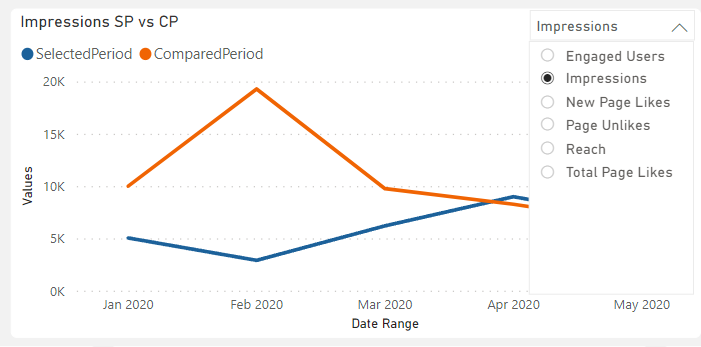
Hi community can someone help me on how do i create a drop down menu like this on a visual that lets me choose different values i want to see and compare. Thanks
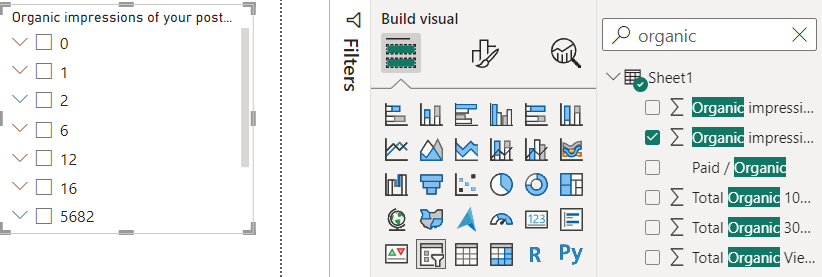
Hi when i try to create the slicer i dont get the list for example like yours with the product line i get mine with values like this
Hi @lisratkoceri ,
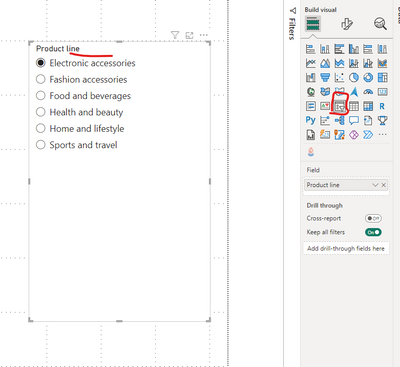
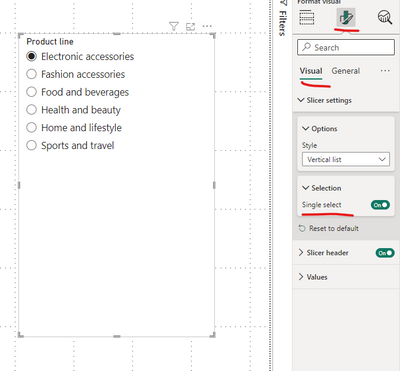
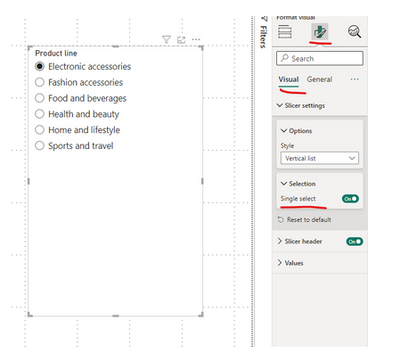
You can add a slicer visual to your report page to get this done. I made the slicer single select.
Then you can use this slicer visual to interact with your chart:
Hope this helps.
Im still having this problem down below i posted it as a comment didnt know i wasnt replying
Still getting the same results
Hi @lisratkoceri ,
I don't know what data you are looking for. You are moving a numeric column to the slicer now. Try moving a categorical column from your data.
May be Paid/Organic column as per your screenshot about the data.
Yes that may be the case since im trying to filter numeric values
Hi @lisratkoceri ,
Yes try using categorical column and also check your requirement what you really want.
Check out the April 2026 Power BI update to learn about new features.
Sign up to receive a private message when registration opens and key events begin.
If you have recently started exploring Fabric, we'd love to hear how it's going. Your feedback can help with product improvements.
| User | Count |
|---|---|
| 36 | |
| 33 | |
| 31 | |
| 21 | |
| 16 |
| User | Count |
|---|---|
| 65 | |
| 53 | |
| 31 | |
| 23 | |
| 23 |