cancel
Showing results for 
Search instead for 
Did you mean: 

July 28 - August 9 | Final Round of the Power BI Dataviz World Championships. This is your chance. Learn more

Reply
lisratkoceri
Frequent Visitor

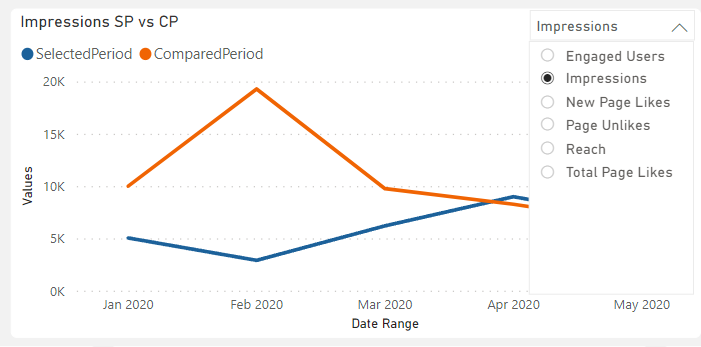
Drop down option

dropdownproblem.png


Hi community can someone help me on how do i create a drop down menu like this on a visual that lets me choose different values i want to see and compare. Thanks

8 REPLIES 8
lisratkoceri
Frequent Visitor

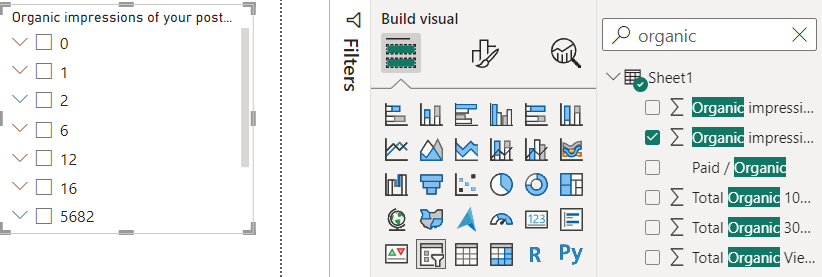
Hi when i try to create the slicer i dont get the list for example like yours with the product line i get mine with values like this resultsss.png

Pragati11
Super User
Super User

Hi @lisratkoceri ,


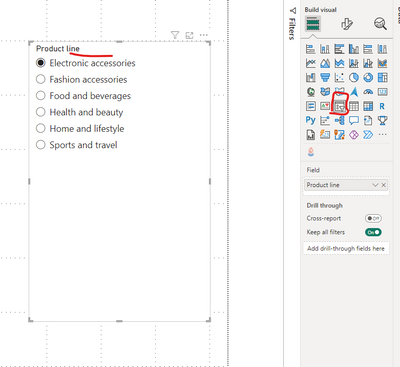
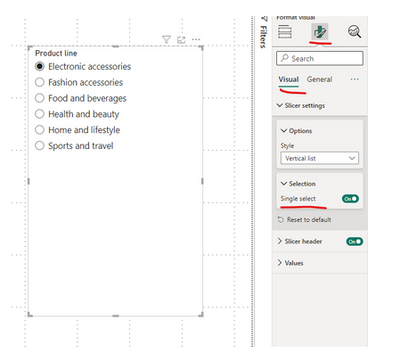
You can add a slicer visual to your report page to get this done. I made the slicer single select.

Pragati11_1-1692091233937.png


Pragati11_0-1692091121436.png

Then you can use this slicer visual to interact with your chart:

PBI tip.gif

Hope this helps.


Best Regards,

Pragati Jain


MVP logo


LinkedIn | Twitter | Blog YouTube 

Did I answer your question? Mark my post as a solution! This will help others on the forum!

Appreciate your Kudos!!

Proud to be a Super User!!

Im still having this problem down below i posted it as a comment didnt know i wasnt replying

Hi @lisratkoceri ,


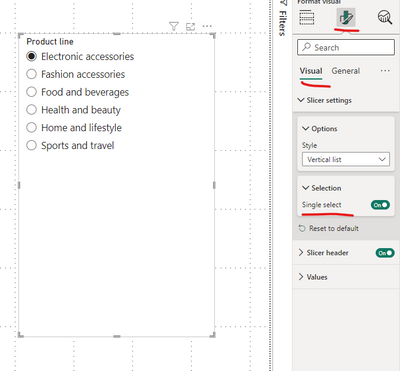
Make sure you have single selection selected under the slicer settings:

Pragati11_0-1692100428602.png


Best Regards,

Pragati Jain


MVP logo


LinkedIn | Twitter | Blog YouTube 

Did I answer your question? Mark my post as a solution! This will help others on the forum!

Appreciate your Kudos!!

Proud to be a Super User!!

powerbihelppp.png

Still getting the same results

Hi @lisratkoceri ,


I don't know what data you are looking for. You are moving a numeric column to the slicer now. Try moving a categorical column from your data.

May be Paid/Organic column as per your screenshot about the data.


Best Regards,

Pragati Jain


MVP logo


LinkedIn | Twitter | Blog YouTube 

Did I answer your question? Mark my post as a solution! This will help others on the forum!

Appreciate your Kudos!!

Proud to be a Super User!!

Yes that may be the case since im trying to filter numeric values

Hi @lisratkoceri ,

Yes try using categorical column and also check your requirement what you really want.


Best Regards,

Pragati Jain


MVP logo


LinkedIn | Twitter | Blog YouTube 

Did I answer your question? Mark my post as a solution! This will help others on the forum!

Appreciate your Kudos!!

Proud to be a Super User!!

Helpful resources

Announcements
FabCon and SQLCon Barcelona 2026

FabCon & SQLCon – Barcelona 2026

Join us in Barcelona for FabCon and SQLCon, the Fabric, Power BI, SQL, and AI community event. Save €200 with code FABCMTY200.

Fabric Community Sticker Design Challenge Barcelona Carousel

Fabric Community Sticker Challenge - Barcelona 2026

If you love stickers, then you will definitely want to check out our community sticker challenge, Barcelona edition!

July Power BI Update Carousel

Power BI Monthly Update - July 2026

Check out the July 2026 Power BI update to learn about new features.

Power BI DataViz World Championships carousel

Power BI DataViz World Championships - June 2026

A new Power BI DataViz World Championship is coming this June! Don't miss out on submitting your entry.

Top Solution Authors