cancel
Showing results for 
Search instead for 
Did you mean: 

The Power BI Data Visualization World Championships is back! Get ahead of the game and start preparing now! Learn more

Reply
shahfx
New Member

Divide two columns

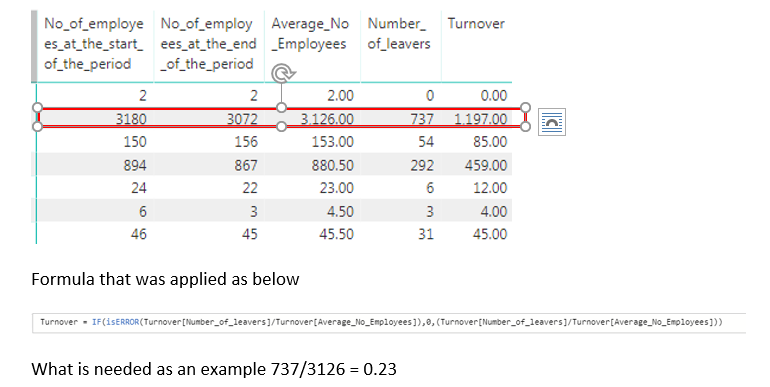
Just perplexed with this problem and new to PowerBI, want to just divide Number of leavers / Average Number of employees but seem to get as strange number when applying the calculation below. (numbers have been generated from excel detail values) Can anyone help please

Capture2.PNG

2 ACCEPTED SOLUTIONS
Greg_Deckler
Community Champion
Community Champion

Try this:


Turnover = DIVIDE(Turnover[Number_of_leavers],Turnover[Average_No_Employees],0)

This assumes that everything is a column.


Follow on LinkedIn
@ me in replies or I'll lose your thread!!!
Instead of a Kudo, please vote for this idea
Become an expert!: Enterprise DNA
External Tools: MSHGQM
YouTube Channel!: Microsoft Hates Greg
Latest book!:
DAX For Humans

DAX is easy, CALCULATE makes DAX hard...

View solution in original post

shahfx
New Member

Solved the issue, this was related to trying to use the divide function without checking the columns were integer values (assumed import from excel might of taken care of that) I then used measures rather than column as was getting incorrect calculated values and having issues with showing decimals etc.  Wow sometimes this was a simple issue, not giving up yet. 


Thank you for all that replied.


View solution in original post

3 REPLIES 3
shahfx
New Member

Solved the issue, this was related to trying to use the divide function without checking the columns were integer values (assumed import from excel might of taken care of that) I then used measures rather than column as was getting incorrect calculated values and having issues with showing decimals etc.  Wow sometimes this was a simple issue, not giving up yet. 


Thank you for all that replied.


v-juanli-msft
Community Support
Community Support

Hi @shahfx

Assume [Number of leavers] and [Average Number of employees] are all columns and don't aggregation like sum, average, ect.

I test with your example data and formula, it shows the correct result as you wanted.

If you have this problem till now, please let me know what's your dataset like and whether any aggregation has been applied.


Best Regards

Maggie

Greg_Deckler
Community Champion
Community Champion

Try this:


Turnover = DIVIDE(Turnover[Number_of_leavers],Turnover[Average_No_Employees],0)

This assumes that everything is a column.


Follow on LinkedIn
@ me in replies or I'll lose your thread!!!
Instead of a Kudo, please vote for this idea
Become an expert!: Enterprise DNA
External Tools: MSHGQM
YouTube Channel!: Microsoft Hates Greg
Latest book!:
DAX For Humans

DAX is easy, CALCULATE makes DAX hard...

Helpful resources

Announcements
Power BI DataViz World Championships

Power BI Dataviz World Championships

The Power BI Data Visualization World Championships is back! Get ahead of the game and start preparing now!

December 2025 Power BI Update Carousel

Power BI Monthly Update - December 2025

Check out the December 2025 Power BI Holiday Recap!

FabCon Atlanta 2026 carousel

FabCon Atlanta 2026

Join us at FabCon Atlanta, March 16-20, for the ultimate Fabric, Power BI, AI and SQL community-led event. Save $200 with code FABCOMM.

Top Solution Authors