Don't miss your chance to take the Fabric Data Engineer (DP-600) exam for FREE! Find out how by watching the DP-600 session on-demand now through April 28th.
Learn moreJoin the FabCon + SQLCon recap series. Up next: Power BI, Real-Time Intelligence, IQ and AI, and Data Factory take center stage. All sessions are available on-demand after the live show. Register now
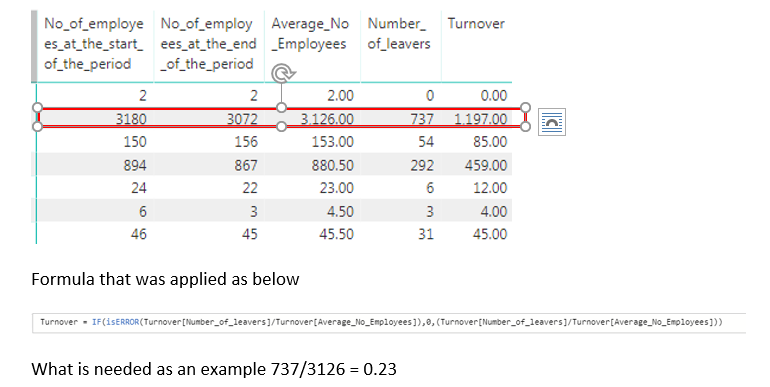
Just perplexed with this problem and new to PowerBI, want to just divide Number of leavers / Average Number of employees but seem to get as strange number when applying the calculation below. (numbers have been generated from excel detail values) Can anyone help please
Solved! Go to Solution.
Try this:
Turnover = DIVIDE(Turnover[Number_of_leavers],Turnover[Average_No_Employees],0)
This assumes that everything is a column.
Solved the issue, this was related to trying to use the divide function without checking the columns were integer values (assumed import from excel might of taken care of that) I then used measures rather than column as was getting incorrect calculated values and having issues with showing decimals etc. Wow sometimes this was a simple issue, not giving up yet.
Thank you for all that replied.
Solved the issue, this was related to trying to use the divide function without checking the columns were integer values (assumed import from excel might of taken care of that) I then used measures rather than column as was getting incorrect calculated values and having issues with showing decimals etc. Wow sometimes this was a simple issue, not giving up yet.
Thank you for all that replied.
Hi @shahfx
Assume [Number of leavers] and [Average Number of employees] are all columns and don't aggregation like sum, average, ect.
I test with your example data and formula, it shows the correct result as you wanted.
If you have this problem till now, please let me know what's your dataset like and whether any aggregation has been applied.
Best Regards
Maggie
Try this:
Turnover = DIVIDE(Turnover[Number_of_leavers],Turnover[Average_No_Employees],0)
This assumes that everything is a column.
Check out the April 2026 Power BI update to learn about new features.
If you have recently started exploring Fabric, we'd love to hear how it's going. Your feedback can help with product improvements.
A new Power BI DataViz World Championship is coming this June! Don't miss out on submitting your entry.
| User | Count |
|---|---|
| 43 | |
| 37 | |
| 35 | |
| 22 | |
| 15 |
| User | Count |
|---|---|
| 65 | |
| 58 | |
| 29 | |
| 27 | |
| 25 |