Share feedback directly with Fabric product managers, participate in targeted research studies and influence the Fabric roadmap.
Sign up nowGet Fabric certified for FREE! Don't miss your chance! Learn more
I have a table that looks like this:
| Asset | IncidentCode | Comments |
| Switch1 | 001 | Broken |
| Switch1 | 001 | Fixed |
| Switch1 | 002 | Who knows? |
| Switch2 | 003 | Broken |
| Switch2 | 004 | Broken |
| Switch2 | 004 | Delayed |
| Switch3 | 005 | Delayed |
I'm trying to create a table visual with a column to indicate how many distinct IncidentCodes each Asset has, which would look like this:
| Asset | TotalIncidents | IncidentCode | Comments |
| Switch1 | 2 | 001 | Broken |
| Switch1 | 2 | 001 | Fixed |
| Switch1 | 2 | 002 | Who knows? |
| Switch2 | 3 | 003 | Broken |
| Switch2 | 3 | 004 | Broken |
| Switch2 | 3 | 005 | Delayed |
| Switch3 | 1 | 006 | Delayed |
Of course if I add a column with a count of the IncidentCode, I get "1" for each row.
Is there something simple I'm missing?
Solved! Go to Solution.
Hey @ReadTheIron ,
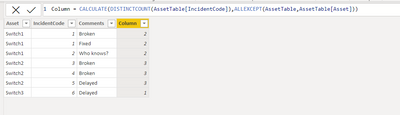
Are you looking for something like this:
Column = CALCULATE(DISTINCTCOUNT(AssetTable[IncidentCode]),ALLEXCEPT(AssetTable,AssetTable[Asset]))
If you add the column again and make it do a Distinct Count, it'll use the context of the table. Try the following measure:
Hey @ReadTheIron ,
Are you looking for something like this:
Column = CALCULATE(DISTINCTCOUNT(AssetTable[IncidentCode]),ALLEXCEPT(AssetTable,AssetTable[Asset]))
This works well - except that it breaks the filter I'm using to get the table in the first place. My data actually looks like this:
FullTable
| Asset | IncidentCode | Comments |
| Switch1 | 001 | Broken |
| Switch1 | 001 | Fixed |
| Switch1 | 002 | Who knows? |
| Switch2 | 003 | Broken |
| Switch2 | 004 | Broken |
| Switch2 | 004 | Delayed |
| Switch3 | 005 | Delayed |
| Joint1 | 006 | Stuck |
| Joint2 | 007 | Stuck |
| Joint2 | 007 | Fixed |
I have another table, related one-to-many on Asset
SwitchTable
| Asset |
| Switch1 |
| Switch2 |
| Switch3 |
I'd been filtering the FullTable visual by SwitchTable [is not blank]. When I applied the measure as written, I got all of the FullTable Assets. I tried modifying it as below, but got the one-per-row problem again.
Hi @ReadTheIron
Try this measure:
StableIncidentsMeasure = CALCULATE(DISTINCTCOUNT(FullTable[IncidentCode]), ALLEXCEPT(FullTable,Fulltable[Asset]), ALLNOBLANKROW(SwitchTable[Asset]))
Thanks! Now I'm being asked for further filtering of the data, so I think that I'm just going to give them a matrix and call it a day, but I really appreciate the help!
Share feedback directly with Fabric product managers, participate in targeted research studies and influence the Fabric roadmap.
| User | Count |
|---|---|
| 62 | |
| 62 | |
| 42 | |
| 21 | |
| 18 |
| User | Count |
|---|---|
| 120 | |
| 105 | |
| 38 | |
| 29 | |
| 28 |