Hello Everyone,
I'm building a gauge chart to show the percent of quotes that a quoter submits before 24 hours passes. I am able to calculate this metric, but I'm having trouble producing the target value.
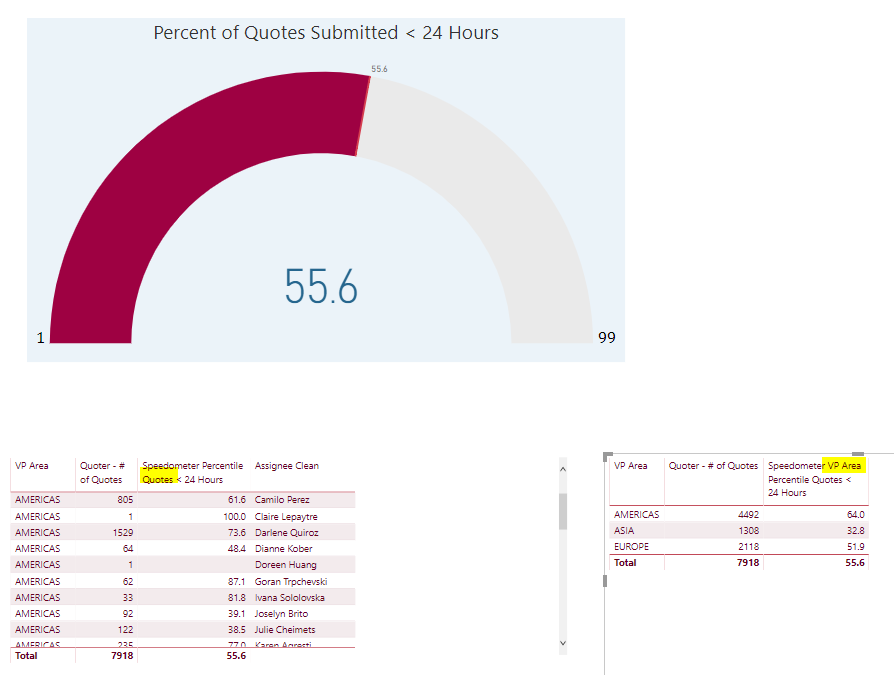 From the tables below, you can see that the calculation is working, and there is a relationship between VP Area and the Quoter.
What I want to see happen, is that when a Quoter is selected from a Report Filter, I expect to see the Quoter Percentile as the Value, and the VP Area Percentile as the target.
Example: Camilo Perez is selected. Value 61.6. Target 64.0.
What's happening is the VP Area Percenile filters along with the selected Quoter.
Does it matter that VP area comes from a different table?
Speedometer Percentile Quotes < 24 Hours =
VAR TotalQuotes =
CALCULATE(
DISTINCTCOUNT(QuotesHeader[Id])
)
Return
DIVIDE(
CALCULATE(
DISTINCTCOUNT(QuotesHeader[Id]),
FILTER(QuotesHeader,QuotesHeader[Submitted_Duration]<86400000)
),
TotalQuotes,0
)*100
***********************************************************************************************************
Speedometer VP Area Percentile Quotes < 24 Hours =
VAR TotalQuotes =
CALCULATE(
DISTINCTCOUNT(QuotesHeader[Id])
)
Return
(CALCULATE(
DISTINCTCOUNT(QuotesHeader[Id]),
FILTER(QuotesHeader,QuotesHeader[Submitted_Duration]<86400000),
ALL(QuotesHeader[Assignee Clean])
)/TotalQuotes)*100


