Learn from the best! Meet the four finalists headed to the FINALS of the Power BI Dataviz World Championships! Register now
Hello
I have a question regarding a Graph.
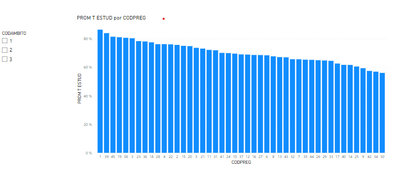
I want to make a Bar Chart with all the questions that the students answered in my survey, however, there are too many and the bar graph is not understood. What I would like is that the Graph is built from the filter you put, so that you can choose the group of questions you want to see.
How can I build the Graph so that, at the beginning it looks blank and is with the filter shows the data?
Hello
Thank you very much for your answer, I created the measure you recommended, however, I do not know how to enter it in the graph, since when I put it in the fields, the graph still appears.
Can you show me the measure please? Thanks
Hi @Syndicate_Admin !
In your measure you can try using the function ISFILTERED. So:
IF(
ISFILTERED( CategoryToFilter ),
ValueToDisplay,
BLANK()
)
Let me know if that helps!
A new Power BI DataViz World Championship is coming this June! Don't miss out on submitting your entry.
Share feedback directly with Fabric product managers, participate in targeted research studies and influence the Fabric roadmap.
| User | Count |
|---|---|
| 52 | |
| 34 | |
| 33 | |
| 17 | |
| 17 |
| User | Count |
|---|---|
| 61 | |
| 60 | |
| 39 | |
| 26 | |
| 24 |