Get Fabric or SQL Certified for Free.
Get certified for free when you join Fabric Data Days 2026 and dive into Fabric, Power BI, SQL, AI, and other essential data skills.
Join now- Power BI forums
- Get Help with Power BI
- Desktop
- Service
- Report Server
- Power Query
- Mobile Apps
- Developer
- DAX Commands and Tips
- Custom Visuals Development Discussion
- Health and Life Sciences
- Power BI Spanish forums
- Translated Spanish Desktop
- Training and Consulting
- Instructor Led Training
- Dashboard in a Day for Women, by Women
- Galleries
- Data Stories Gallery
- Themes Gallery
- Contests Gallery
- QuickViz Gallery
- Quick Measures Gallery
- Visual Calculations Gallery
- Fabric Apps Gallery
- Notebook Gallery
- Translytical Task Flow Gallery
- TMDL Gallery
- R Script Showcase
- Webinars and Video Gallery
- Ideas
- Custom Visuals Ideas (read-only)
- Issues
- Issues
- Events
- Upcoming Events
July 28 - August 9 | Final Round of the Power BI Dataviz World Championships. This is your chance. Learn more
- Power BI forums
- Forums
- Get Help with Power BI
- Desktop
- Re: Display Unit Formatting
- Subscribe to RSS Feed
- Mark Topic as New
- Mark Topic as Read
- Float this Topic for Current User
- Bookmark
- Subscribe
- Printer Friendly Page


- Mark as New
- Bookmark
- Subscribe
- Mute
- Subscribe to RSS Feed
- Permalink
- Report Inappropriate Content
Display Unit Formatting
Hello all,
I am wondering if it is possible to correct the current formatting of display units in Power BI. Currently, I have a report which displays values both in the millions and in the billions, and the Display Units are set to auto on both cards and a bar chart. However, the unit abbreviations displayed are :
bn = billions
M = millions
The client would prefer to see a 'B' used to represent billions
Is there any way to update these display units?
Thanks!
Solved! Go to Solution.
- Mark as New
- Bookmark
- Subscribe
- Mute
- Subscribe to RSS Feed
- Permalink
- Report Inappropriate Content
I have voted for an existing idea and updated with the specifics of this thread. Please vote for it here: https://ideas.powerbi.com/ideas/idea/?ideaid=ebe46bf1-b559-477d-9651-ecad6a614371

- Mark as New
- Bookmark
- Subscribe
- Mute
- Subscribe to RSS Feed
- Permalink
- Report Inappropriate Content
@ldittmann970 did you ever figure out to edit this? The standard finance formatting is $M for thousands, $MM for millions, and $B for billions. I cannot figure out how to change the display units for visualizations.
- Mark as New
- Bookmark
- Subscribe
- Mute
- Subscribe to RSS Feed
- Permalink
- Report Inappropriate Content
I have voted for an existing idea and updated with the specifics of this thread. Please vote for it here: https://ideas.powerbi.com/ideas/idea/?ideaid=ebe46bf1-b559-477d-9651-ecad6a614371


- Mark as New
- Bookmark
- Subscribe
- Mute
- Subscribe to RSS Feed
- Permalink
- Report Inappropriate Content
Chiming in from December 2019, this is a necessary fix.
- Mark as New
- Bookmark
- Subscribe
- Mute
- Subscribe to RSS Feed
- Permalink
- Report Inappropriate Content
- Mark as New
- Bookmark
- Subscribe
- Mute
- Subscribe to RSS Feed
- Permalink
- Report Inappropriate Content
Has anyone seen an enhancement request to fix this? I would certainly vote for it.
- Mark as New
- Bookmark
- Subscribe
- Mute
- Subscribe to RSS Feed
- Permalink
- Report Inappropriate Content
https://ideas.powerbi.com/ideas/idea/?ideaid=ebe46bf1-b559-477d-9651-ecad6a614371 please vote for this idea

- Mark as New
- Bookmark
- Subscribe
- Mute
- Subscribe to RSS Feed
- Permalink
- Report Inappropriate Content
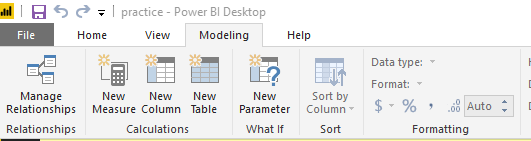
Format the data in the formatting tab
- Mark as New
- Bookmark
- Subscribe
- Mute
- Subscribe to RSS Feed
- Permalink
- Report Inappropriate Content
To clarify, what I need to format is the display unit label of 'bn' , not my measure or column. I would like to indicate billions by using a capital 'B' rather than 'bn'

Is there a way in the Modeling toolbar or any other way to edit this?
- Mark as New
- Bookmark
- Subscribe
- Mute
- Subscribe to RSS Feed
- Permalink
- Report Inappropriate Content
Hi @ldittmann970,
Nope, current you can only use format function to change numeric unit.
BTW, even if you change the display format, the result is also transformed to text.
Regards,
Xiaoxin Sheng

- Mark as New
- Bookmark
- Subscribe
- Mute
- Subscribe to RSS Feed
- Permalink
- Report Inappropriate Content
Good afternoon,
The display units current set up from None, thousands and up, is there anyway to set up the display in tens, and hundreds? Thanks and please advise!

- Mark as New
- Bookmark
- Subscribe
- Mute
- Subscribe to RSS Feed
- Permalink
- Report Inappropriate Content
Hi @Anonymous can you please review our questions on this ticket and please advise?
- Mark as New
- Bookmark
- Subscribe
- Mute
- Subscribe to RSS Feed
- Permalink
- Report Inappropriate Content
To chime in here, what we're struggling with is why Billions shows up as "bn" and why millions shows up as "M". These are not necessarily standard abbreviations for this sort of data. Is there any insight as to why this particular methodology was chosen @Anonymous?
Helpful resources

FabCon & SQLCon – Barcelona 2026
Join us in Barcelona for FabCon and SQLCon, the Fabric, Power BI, SQL, and AI community event. Save €200 with code FABCMTY200.

Fabric Community Sticker Challenge - Barcelona 2026
If you love stickers, then you will definitely want to check out our community sticker challenge, Barcelona edition!

Power BI Monthly Update - July 2026
Check out the July 2026 Power BI update to learn about new features.

Power BI DataViz World Championships - June 2026
A new Power BI DataViz World Championship is coming this June! Don't miss out on submitting your entry.

| User | Count |
|---|---|
| 25 | |
| 23 | |
| 23 | |
| 17 | |
| 14 |


| User | Count |
|---|---|
| 25 | |
| 24 | |
| 20 | |
| 20 | |
| 19 |


