cancel
Showing results for 
Search instead for 
Did you mean: 

Vote for your favorite vizzies from the Power BI Dataviz World Championship submissions. Vote now!

Reply
akamiller
New Member

Display Query Parameter Values as a Label on a Report

I know you can't yet interact with the parameters on a report, but how I can display the value of a parameter as a label at the top of a report?


I'm going to save my report as a template.  I then want to enter my two parameter values when I use the template (start date and end date).  My queries will run using these parameters and I want to display the value of those parameters at the top of the report.  Is this possible?  I can't seem to find anything here in the forum.

1 ACCEPTED SOLUTION
ankitpatira
Community Champion
Community Champion

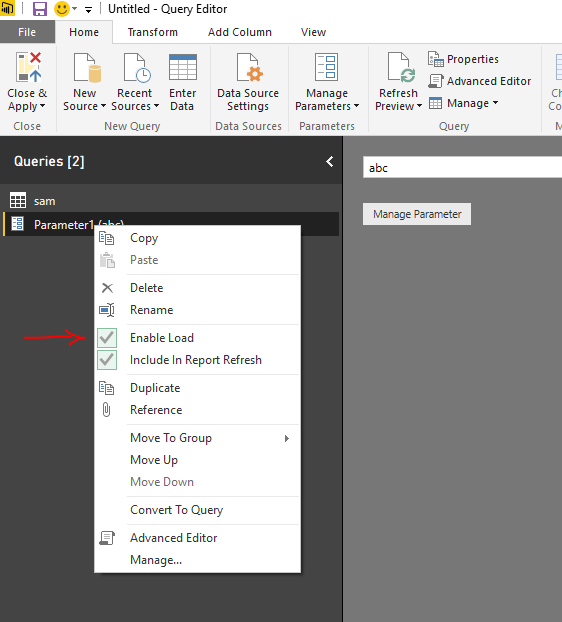
@akamiller in power bi desktop under query editor right click your parameters and click Enable Load. Close & Apply and that will make your parameters visible in reports. Then depending on the parameter type if number then you can use KPI visual or if text then download custom visual called Long Text Viewer and use that to drag and drop parameters onto report.


Capture.PNG

View solution in original post

4 REPLIES 4
ankitpatira
Community Champion
Community Champion

@akamiller in power bi desktop under query editor right click your parameters and click Enable Load. Close & Apply and that will make your parameters visible in reports. Then depending on the parameter type if number then you can use KPI visual or if text then download custom visual called Long Text Viewer and use that to drag and drop parameters onto report.


Capture.PNG

Can't seem to find the Long Text Viewer visual, any alternatives?

Search it in google and then download it. You wont find it in visual market in power bi desktop, but u have to upload it as a file

Long Text Viewer - exactly what I needed!  Thanks!

Helpful resources

Announcements
Power BI DataViz World Championships

Power BI Dataviz World Championships

Vote for your favorite vizzies from the Power BI World Championship submissions!

Sticker Challenge 2026 Carousel

Join our Community Sticker Challenge 2026

If you love stickers, then you will definitely want to check out our Community Sticker Challenge!

January Power BI Update Carousel

Power BI Monthly Update - January 2026

Check out the January 2026 Power BI update to learn about new features.

FabCon Atlanta 2026 carousel

FabCon Atlanta 2026

Join us at FabCon Atlanta, March 16-20, for the ultimate Fabric, Power BI, AI and SQL community-led event. Save $200 with code FABCOMM.