This time we’re going bigger than ever. Fabric, Power BI, SQL, AI and more. We're covering it all. You won't want to miss it.
Learn moreLevel up your Power BI skills this month - build one visual each week and tell better stories with data! Get started
Hi,
I have a table fetchind data using direct query and it has a timestamp column. I would like to convert the timestamp to another time zone. the way i would do it in import mode would be to create a custom column and add Duration like this
[timestamp] + #duration(3,0,0)
How can i do this with direct query since direct query do not support creating custom column and I cant find a way to add measure here?
Hi, @PowerrrBrrr ;
You could create a measure as follows:
TimeTampe2 = MAX([timestamp])+TIME(3,0,0)
Here you use "[timestamp] + #duration(3,0,0)" which is #duration(0,3,0,0) ? if so, the above formula fits, if not, you can modify the time yourself.
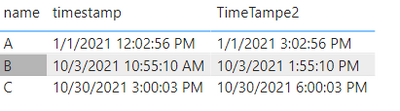
The final output is shown below:
Best Regards,
Community Support Team_ Yalan Wu
If this post helps, then please consider Accept it as the solution to help the other members find it more quickly.
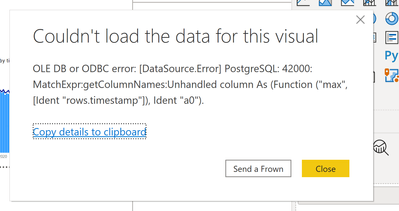
@v-yalanwu-msft Did you bring timestamp column from a direct query table? I did the same as mentioned by you and I get error as
"OLE DB or ODBC error: [DataSource.Error] PostgreSQL: 42000: MatchExpr:getColumnNames:Unhandled column As (Function ("max", [Ident "rows.timestamp"]), Ident "a0").
"
Hi, @PowerrrBrrr ;
Can you share the error screenshot , and it should noted :here i create a mesure by dax.
Best Regards,
Community Support Team_ Yalan Wu
Hi @PowerrrBrrr
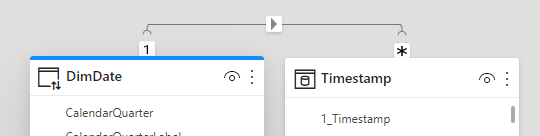
You might want to add a
Regards
Amine Jerbi
If I answered your question, please mark this thread as accepted
and you can follow me on
My Website, LinkedIn and Facebook
@aj1973 creating a calculated table using a DAX expression is not supported in DirectQuery mode.
Says who???
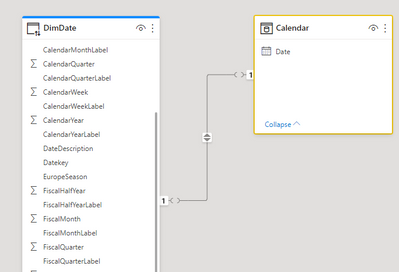
Have you tried? I have look at the img
Regards
Amine Jerbi
If I answered your question, please mark this thread as accepted
and you can follow me on
My Website, LinkedIn and Facebook
Check out the April 2026 Power BI update to learn about new features.
Sign up to receive a private message when registration opens and key events begin.
If you have recently started exploring Fabric, we'd love to hear how it's going. Your feedback can help with product improvements.
| User | Count |
|---|---|
| 37 | |
| 28 | |
| 28 | |
| 19 | |
| 17 |
| User | Count |
|---|---|
| 68 | |
| 37 | |
| 32 | |
| 28 | |
| 24 |