cancel
Showing results for 
Search instead for 
Did you mean: 

July 7 - July 17 | Round 2 of the Power BI Dataviz World Championships. Don't miss your chance! Learn more

Reply
PowerrrBrrr
Helper III
Helper III

Direct Query limitation on Time()

Hi,
I have a table fetchind data using direct query and it has a timestamp column. I would like to convert the timestamp to another time zone. the way i would do it in import mode would be to create a custom column and add Duration like this
[timestamp] + #duration(3,0,0)
How can i do this with direct query since direct query do not support creating custom column and I cant find a way to add measure here?

7 REPLIES 7
v-yalanwu-msft
Community Support
Community Support

Hi, @PowerrrBrrr ;

You could create a measure  as follows:

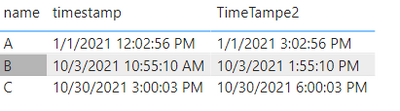
TimeTampe2 = MAX([timestamp])+TIME(3,0,0)

Here you use "[timestamp] + #duration(3,0,0)" which is #duration(0,3,0,0) ? if so, the above formula fits, if not, you can modify the time yourself.

The final output is shown below:

vyalanwumsft_0-1632883903805.png

Best Regards,
Community Support Team_ Yalan Wu
If this post helps, then please consider Accept it as the solution to help the other members find it more quickly.

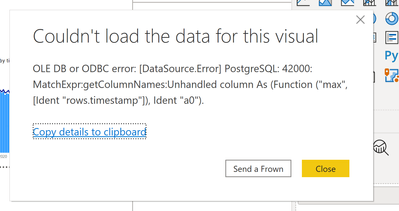
@v-yalanwu-msft Did you bring timestamp column from a direct query table? I did the same as mentioned by you and I get error as
"OLE DB or ODBC error: [DataSource.Error] PostgreSQL: 42000: MatchExpr:getColumnNames:Unhandled column As (Function ("max", [Ident "rows.timestamp"]), Ident "a0").
"

Hi, @PowerrrBrrr ;

Can you share the error screenshot , and it should noted :here i create a mesure by dax.

Best Regards,
Community Support Team_ Yalan Wu

PowerrrBrrr_0-1632900389606.png


aj1973
Community Champion
Community Champion

Hi @PowerrrBrrr 

You might want to add a

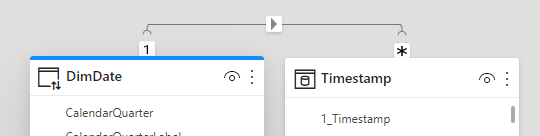
  • Table with a generic Timestamp column like the one you have in your Fetched table.
  • To the new table add a column with the duration you want to add(can't do it in power query though)
  • Relate the 2 tables on the Timestamp columns
  • You should get something close to this

aj1973_0-1632664360298.png


Regards
Amine Jerbi

If I answered your question, please mark this thread as accepted
and you can follow me on
My Website, LinkedIn and Facebook

@aj1973  creating a calculated table using a DAX expression is not supported in DirectQuery mode.

Says who???

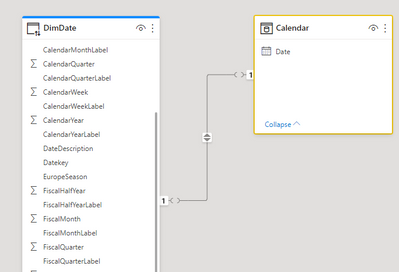
aj1973_0-1632675513736.png

Have you tried? I have look at the img

Regards
Amine Jerbi

If I answered your question, please mark this thread as accepted
and you can follow me on
My Website, LinkedIn and Facebook

Helpful resources

Announcements
FabCon and SQLCon Barcelona 2026

FabCon & SQLCon – Barcelona 2026

Join us in Barcelona for FabCon and SQLCon, the Fabric, Power BI, SQL, and AI community event. Save €200 with code FABCMTY200.

60 days of Data Days Carousel

Data Days 2026

Join Fabric Data Days 2026: 60 days of free live/on-demand sessions, challenges, study groups, and certification opportunities.

Power BI DataViz World Championships carousel

Power BI DataViz World Championships - June 2026

A new Power BI DataViz World Championship is coming this June! Don't miss out on submitting your entry.

Top Solution Authors